June 25, 2026
 153 Views
Azure DevOps Salesforce Integration: The Complete Enterprise Guide


Azure DevOps Salesforce integration turns customer feedback into development action and keeps support and engineering working from the same data.
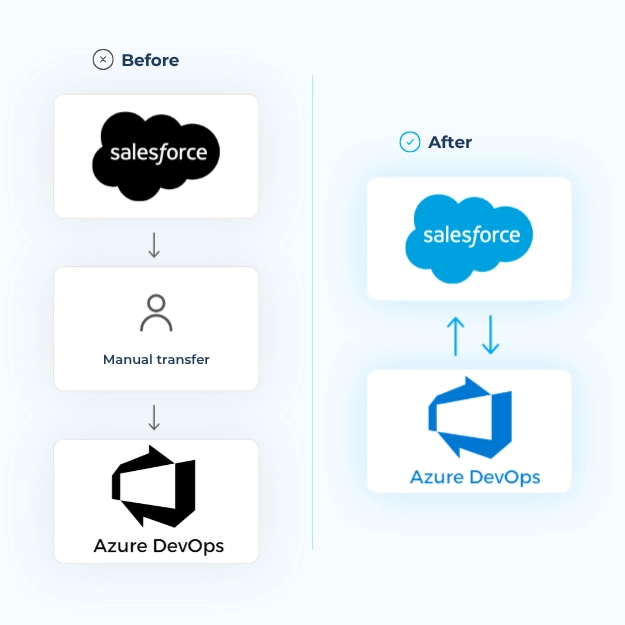
When support runs on Salesforce and engineering runs on Azure DevOps, the handoff between them can become one of the most expensive workflows in the company. A customer reports a defect as a Salesforce Case, an agent re-enters it into an Azure DevOps work item, engineering fixes it, and the Case remains open because nobody pushed the status back.
Across hundreds of escalations each month, this can mean slower resolution, frustrated customers, and two teams working from different data.
Peeklogic Connector for Salesforce and Azure DevOps closes that gap by creating a streamlined, two-way flow that converts customer feedback into development tasks while keeping both teams synchronized.
Get One Extra Year of Peeklogic Connector for Free
Claim the OfferKey Takeaways
- Azure DevOps Salesforce integration links Salesforce Cases to Azure DevOps work items so support and engineering work from one source of truth.
- Synchronization is bi-directional and real time, covering statuses, comments, attachments, and custom fields.
- A native, AppExchange-listed connector is the lowest-maintenance method for most support-to-engineering teams.
- Reliable integrations must account for Salesforce API and governor limits at enterprise volume.
- Peeklogic Connector supports configuration through Salesforce Flow Builder, secured with OAuth 2.0, without custom code for common workflows.
What Is Azure DevOps Salesforce Integration?
Azure DevOps Salesforce integration connects Salesforce CRM records, including Cases, Accounts, Contacts, Opportunities, and custom objects, with Azure DevOps work items, bugs, and user stories.
Changes made in one system can create, update, and reflect records in the other. In most enterprise deployments, the integration is bi-directional. A Salesforce Case can create an Azure DevOps work item, while changes to its status, comments, or assignee flow back to the Case.
The result is that support teams can see development progress without leaving Salesforce, while engineering teams receive customer context without opening the CRM.
Salesforce Service Cloud
Salesforce Service Cloud centralizes case management, omnichannel support, and customer engagement. It captures, routes, and resolves customer inquiries while maintaining detailed interaction histories.
It also supports workflow automation, service-level agreements, and personalized customer experiences across multiple channels.
Azure DevOps
Azure DevOps is Microsoft’s end-to-end software development platform. It combines version control, agile planning, continuous integration, and deployment automation.
Development teams use it to plan sprints, track work items, manage repositories, automate builds, and coordinate releases across different development methodologies.
Want to see how Peeklogic Azure DevOps Connector works?
Book a DemoWhy Integrate Salesforce With Azure DevOps?
The main reason teams pursue Salesforce Azure DevOps integration is the manual handoff between support and engineering.
Instead of an agent manually recreating a defect, the Salesforce Case becomes an Azure DevOps work item automatically. Relevant fields are mapped across, and both records remain linked throughout the issue lifecycle.
The Real Cost of the Manual Handoff
Without integration, teams lose time recreating case details, requesting status updates from developers, manually updating Cases, and searching through email threads for customer context.
This process can lead to:
- data-entry errors
- lost context during escalation
- slower customer responses
- different versions of the same information across teams
Connecting Salesforce and Azure DevOps helps address these problems:
- Customer-Driven Development: Customer feedback captured in Salesforce can directly influence development priorities in Azure DevOps.
- Transparent Issue Tracking: Support teams can view development progress without accessing development tools.
- Faster Defect Resolution: Bug reports reach engineering automatically with complete context.
- Closed Feedback Loop: Completed fixes can trigger automatic updates for support teams.
- Better Root Cause Analysis: Developers receive environment details, reproduction steps, and customer impact directly from the Case.
Common Azure DevOps Salesforce Integration Use Cases
Bug Management Lifecycle
When customers report software defects through Salesforce, the integration can automatically create corresponding bug work items in Azure DevOps with reproduction steps and environmental context.
Developers update the status and add technical notes during investigation. These updates flow back to Salesforce, allowing agents to keep customers informed. After deployment, the Case can update automatically with resolution details.
Feature Request Prioritization
Customer feature requests captured in Salesforce can synchronize to Azure DevOps as user stories or feature work items.
Product managers gain visibility into request frequency and business impact, helping them prioritize backlogs using real customer demand. As features progress, support teams can provide customers with accurate updates.
Release Impact Assessment
The integration can help support teams view upcoming releases and related fixes directly in Salesforce.
Agents can identify which customers will benefit from a release and coordinate targeted communication about improvements.
Technical Escalation Workflow
Cases that meet predefined criteria can automatically generate Azure DevOps tasks assigned to the appropriate technical specialists.
Customer context remains connected to the work item, accountability is preserved, and the resolution process becomes easier to track.
What Data Can Be Synced Between Salesforce and Azure DevOps?
A complete integration moves both records and the information stored within them.
Salesforce records
- Cases
- Accounts
- Contacts
- Opportunities
- Custom objects
Azure DevOps records
- Work items
- Bugs
- Tasks
- User stories
- Features
- Epics
Record data
- Comments and discussion threads
- Attachments and files
- Statuses and state transitions
- Priorities and severity
- Labels and tags
- Standard and custom fields
- Assignees and ownership
Custom field mapping is what separates a practical enterprise integration from a basic connector. Enterprise Salesforce environments depend heavily on custom fields, and limited mapping can force teams back into manual updates.
Peeklogic synchronizes standard and custom fields, including statuses, comments, and attachments, so records remain complete on both sides.
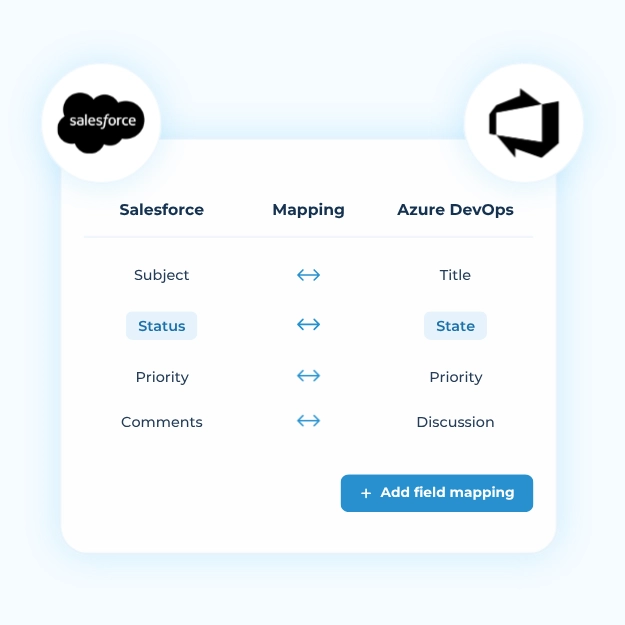
Salesforce ↔ Azure DevOps Field Mapping
Once the connected objects are defined, the next step is deciding how individual fields align and in which direction each value should flow.
| Salesforce | Direction | Azure DevOps |
|---|---|---|
| Case Number | Reference → | Work Item ID |
| Subject | ↔ | Title |
| Description | ↔ | Description |
| Status | ↔ | State |
| Priority | ↔ | Priority |
| Owner | ↔ | Assigned To |
| Account | → | Tag or Area Path |
| Case Type | → | Work Item Type |
| Case Comments | ↔ | Discussion |
| Attachments | ↔ | Attachments |
| Custom Fields | ↔ | Custom Fields |
Two-way mapping keeps both records aligned throughout the issue lifecycle. When a developer changes the State in Azure DevOps, the Case Status updates in Salesforce, and vice versa.
One-way mappings are useful when context only needs to transfer during record creation.
Peeklogic supports declarative mapping for standard and custom fields through Salesforce Flow Builder, allowing teams to configure synchronization without writing custom code for common workflows.
Key Features of a Salesforce Azure DevOps Integration
- Intelligent Work Item Creation: Automatically generate bugs, user stories, or tasks based on Salesforce Case categorization.
- Customizable Field Mapping: Align organization-specific fields and terminology across both platforms.
- Sprint and Release Association: Connect customer Cases with development sprints and releases.
- Bi-Directional Updates: Synchronize changes to status, priority, comments, and related information.
- Attachment Synchronization: Transfer screenshots, logs, and diagnostic files to engineering teams.
- Custom Query Support: Define filtered synchronization rules so only relevant issues reach development.
- Reporting Integration: Combine customer service and development data in cross-team dashboards.
Azure DevOps Salesforce Integration Methods Compared
The chosen integration method determines implementation cost, time-to-value, flexibility, and long-term maintenance requirements.
| Method | Implementation Time | Maintenance | Best For |
|---|---|---|---|
| Native API integration | High, often months | High, owned internally | Strong in-house development teams with unusual requirements |
| Custom development | High, often months | Very high | One-off requirements not covered by an existing product |
| Middleware | Medium | Medium to high | Data consolidation and reporting rather than live workflow synchronization |
| iPaaS platform | Low to medium, often weeks | Medium | Connecting many applications through one platform |
| Dedicated Salesforce and Azure DevOps connector | Low, often days or weeks | Low, vendor-maintained | Deep, support-focused synchronization without building an integration |
Native and custom builds provide significant control, but every Salesforce release and API change becomes the internal team’s responsibility.
Middleware is effective for moving data into a warehouse or reporting platform, but it may be less suitable for real-time, field-level workflow synchronization.
A dedicated Salesforce-native connector such as Peeklogic installs into the Salesforce org, uses familiar Salesforce automation tools, and is maintained by the vendor.
Challenges of Integrating Salesforce and Azure DevOps
- API rate limits: An inefficient integration can consume the daily API allocation quickly.
- Complex field mapping: Salesforce and Azure DevOps may model status, priority, and ownership differently.
- Duplicate data: Weak linking and retry logic can create duplicate work items.
- Workflow conflicts: Teams need rules for which system controls fields that can be edited on both sides.
- Multi-team governance: Support, engineering, and product teams need clear ownership rules.
- Security and compliance: Credential management, access, and auditing must meet enterprise requirements.
- Scalability and latency: A setup that works for 50 Cases per day may not work for 5,000.
Salesforce API Limits and Performance Considerations
Enterprise integrations must be designed around Salesforce governor and API limits. A setup may work correctly during testing but fail after production volumes increase.
| Limit | Value | Notes |
|---|---|---|
| Daily API requests, Enterprise Edition | 100,000 per 24 hours, plus 1,000 per user licence | Shared across REST, SOAP, Bulk, and Connect APIs |
| Over-limit behaviour | Soft limit, then blocked | Sustained overuse returns errors until usage decreases |
| Bulk API | 15,000 batches per 24 hours | Up to 10,000 records and 10 MB per batch |
| Governor limits | Per transaction | SOQL, DML, and CPU limits still apply |
Common architectural approaches include:
- asynchronous processing
- webhook optimization
- selective synchronization
- stable trigger logic
- efficient field mapping
As a native Salesforce application, Peeklogic Connector is designed to operate within these limits while keeping connected records current.
Security Considerations for Enterprise Integrations
An integration between two systems of record should support:
- OAuth authentication
- encrypted data transfer
- role-based access
- audit logs
- data residency and compliance controls
- secure credential storage
Peeklogic supports OAuth 2.0, Personal Access Tokens, and Salesforce Named Credentials, helping teams align the integration with enterprise credential-management practices.
How to Integrate Azure DevOps With Salesforce Using Peeklogic
Peeklogic Connector is a Salesforce-native, AppExchange-listed application. Setup takes place inside the Salesforce org using tools that administrators already understand.
1. Install from the AppExchange
Add Peeklogic Connector to the Salesforce org and assign the required permission sets.
2. Authenticate to Azure DevOps
Connect using OAuth 2.0, a Personal Access Token, or Salesforce Named Credentials.
3. Map objects and fields
Define which Salesforce objects connect to which Azure DevOps work item types. Configure how statuses, priorities, standard fields, and custom fields translate.
4. Build automation in Flow Builder
Use Peeklogic Apex Invocable Actions to create declarative rules. For example, Salesforce can create a bug in the appropriate Azure DevOps project when a Case is classified as a defect.
5. Work with Azure DevOps items inside Salesforce
Agents can create, link, search, and filter Azure DevOps items through the Lightning Web Component directly from the Salesforce Case.
6. Test in a sandbox
Validate bi-directional updates, field conflicts, permissions, and larger data scenarios before production deployment.
7. Roll out and monitor
Begin with a pilot team, monitor API use and synchronization behaviour, and refine the configuration before wider rollout.
Watch Peeklogic Azure DevOps Connector in Action
See how the connector helps Salesforce and Azure DevOps teams automate handoffs, synchronize work items, and keep support and engineering aligned in real time.
The product walkthrough highlights how teams can:
- synchronize more than 400 Salesforce entities, including custom objects
- synchronize more than 30 Azure DevOps fields, including custom fields, comments, attachments, titles, and descriptions
- automate work item creation, comments, attachments, subtasks, and related workflows
- configure processes through an easy-to-use workflow builder
- set up the connector in less than 30 minutes
- enable seamless two-way synchronization
Start with Peeklogic Azure DevOps Connector PRO
Try Peeklogic PROBest Practices for Salesforce Azure DevOps Integration
- Standardize classification between Salesforce Cases and Azure DevOps work item types.
- Define clear escalation rules.
- Align priorities and resolution logic across teams.
- Synchronize only the information both teams need.
- Review mapping and automation rules regularly.
- Keep reporting visible for both support and engineering.
- Test changes in a sandbox before updating production logic.
Why Peeklogic Connector Is Different
Peeklogic Azure DevOps Connector is built as a Salesforce-native solution rather than a loose external bridge.
This provides:
- a native administration experience inside Salesforce
- Flow Builder configuration
- support for standard and custom objects
- support for standard and custom fields
- multi-organization and multi-project flexibility
- real-time synchronization for work items, comments, and attachments
- better visibility for support teams
- lower maintenance requirements than a fully custom integration
The connector is designed for enterprise teams that need to connect customer-facing operations with technical execution without building and maintaining a complex integration from scratch.
Frequently Asked Questions
The most reliable method for most enterprise teams is a native connector installed in Salesforce and configured with field mapping, authentication, and automation rules.
Yes. That is one of the most common use cases. A Case can create a linked work item, and the two records can stay synced.
Yes. A strong connector supports two-way sync for status, comments, assignee changes, attachments, and custom fields.
Cases, Accounts, Contacts, Opportunities, custom objects, work items, bugs, tasks, user stories, features, epics, attachments, priorities, comments, and custom fields.
Yes. Peeklogic Connector supports standard and custom fields, which is critical for enterprise use cases.
Yes. Peeklogic supports multiple organizations and projects in one Salesforce instance.
Yes, when implemented correctly. Peeklogic supports OAuth 2.0, PAT, Named Credentials, encrypted transfer, and secure credential handling.
Not for common workflows. Many setups can be configured through Salesforce Flow Builder and native connector settings.


Salesforce Integration & Implementation | AppExchange and Custom Development | Data Migration
Contact us today!