July 08, 2026
 45 Views
Custom Salesforce-Jira Integration vs Ready-Made Connector: What It Really Costs to Build vs Buy


Most Salesforce-Jira integration decisions start with a simple question: how do we get these two tools talking to each other?
Engineering and support teams run on different platforms by design. And that is obvious, because they have completely different sets of goals. For Salesforce, the aim is to manage customer relationships, while Jira owns the technical work. But the problem is that oftentimes what’s happening on one end influences the other.
A customer reports a bug. That complaint goes towards Salesforce. The fix takes place in Jira. And by default, those two worlds are not connected. Teams lose time, patience, leads, and ultimately money. According to IDC, companies lose 20–30% of their revenue annually due to inefficiencies like these.
So, how to fix this? First solution: build the integration from scratch. Write the code, configure the API, deploy it, and maintain it. Second: take a ready-made connector and go live within hours.
Both sound reasonable on the surface, but beneath it, the difference runs into hundreds of hours and tens of thousands of dollars.
This post breaks down what each path actually involves: budget, timeline, team requirements, and (spoiler alert!) what happens when Salesforce ships its next major release.
What Building a Salesforce-Jira Integration Involves in Practice
The work starts with authentication and doesn’t end there. A production-ready Salesforce-Jira integration requires REST API connectivity between the two platforms, OAuth 2.0 handling for both systems, webhook infrastructure for real-time event delivery, field mapping logic, data transformation rules, error handling, a retry queue, and a complete test suite.
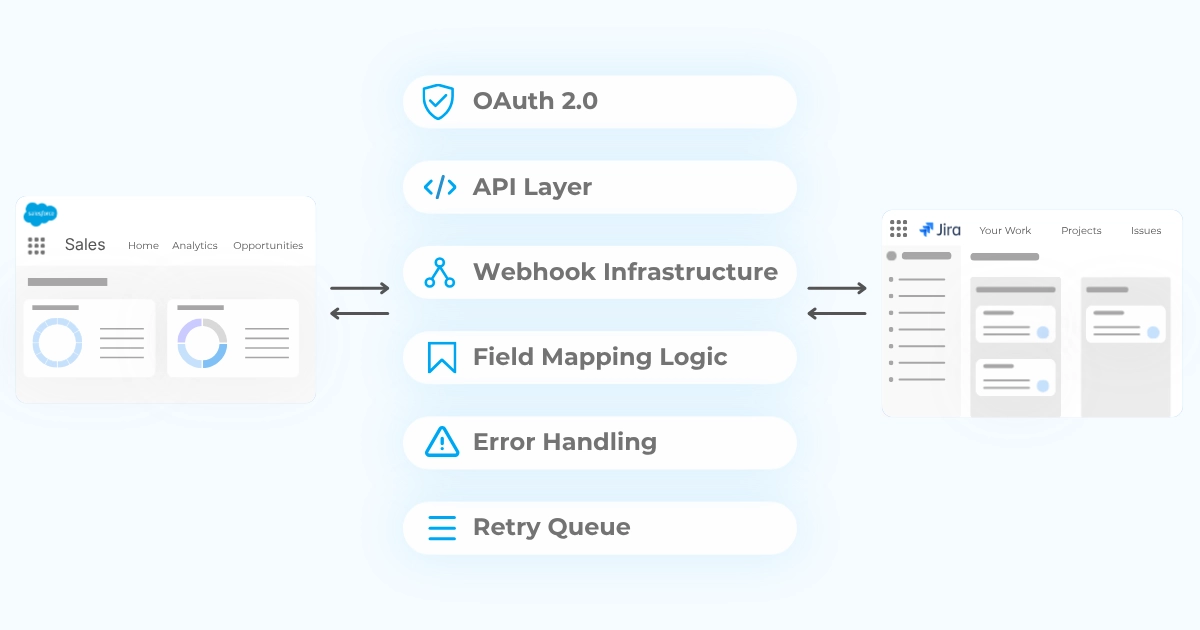
Under most circumstances, more business-specific requirements also come on top of all of that.
Authentication and API Architecture
OAuth 2.0 is where every custom integration starts. Per-user authorization, token exchange, token storage, automatic refresh before every API call: the setup runs 24–32 hours. Automatic token refresh logic adds another 8 hours on top.
Then comes the architecture decision that shapes everything downstream: Jira Cloud and Jira Server/Data Center run different APIs, authenticate differently, and deliver webhooks differently. A solution built for Cloud doesn’t transfer to Data Center. That choice gets made at project start and doesn’t get revised cheaply.
Named Credentials in Salesforce, Apex REST callouts, endpoint configuration: all of it needs to be built, documented, and revisited every time either platform ships an API update.
Field Mapping, Data Transformation, and Sync Logic
A Salesforce Case and a Jira Issue are not the same object described in two different interfaces. They organize data for two different teams with two different workflows.
Picklist values rarely align across platforms. For example, a case status of “Escalated” has no direct Jira equivalent. Custom fields exist on one side without counterparts on the other. When those gaps need bridging, someone writes the logic. When the business rule behind the mapping changes, that person rewrites it again.
Bidirectional sync introduces write conflicts. A support agent updates a Case field in Salesforce; simultaneously, an engineer transitions the Jira Issue. The integration needs a rule for which value survives. One answer for status fields, another for text fields, a third for custom objects with dependent picklists. Each scenario gets its own decision; each decision gets its own code.
Field mapping and serialization takes 16 hours minimum. Column and display configuration requires 32–48 hours on top.
Webhooks, Real-Time Sync, and Error Handling
A callout that fires once is not a sync that works reliably. Webhooks fail. Network timeouts, payload size limits, endpoint downtime: these are routine in production. A failed event without a queue disappears. One timeout without retry logic leaves records out of alignment indefinitely. Without an audit trail, the failure is invisible until someone notices the data doesn’t match.
Async event queue with retry handling runs 32–40 hours. Structured error handling and logging across all services: 16–24 hours.
What’s worse:
Misaligned records don’t announce themselves; the gap grows until it surfaces in a customer call or a support escalation.
The Real Budget: What Salesforce Custom Development Costs
Minimum viable integration covers OAuth, one-way sync, and basic security. Those features together run about 100–140 hours of development time.
That gets two systems connected. It doesn’t include bidirectional sync, configurable field mapping, search, record linking, or any workflow your team will actually use.
Full feature parity with a production-grade connector takes 470–680 hours.
Salesforce development expertise runs $100–150/hour at standard market rates. That puts the numbers at:
- Minimum viable integration: $15,000–$30,000+
- Full-featured, production-ready integration: $70,000–$100,000+
Meanwhile, a no-code Jira Connector for Salesforce starts at $20/month, includes a 30-day trial, and currently comes with a limited-time offer of an extra free year:
Get One Extra Year of Peeklogic Connector for Free
Claim the OfferMinimum Budget Estimates for a Working Integration
The 100–140 hour MVP calculation covers: OAuth setup, token refresh, one-way task sync for creates and updates, one-way sync for deletes, error handling, and role-based access control.
Your MVP connects two systems. However, it gives your team nothing configurable, bidirectional, or searchable. Most projects that scope an MVP expand within the first month of use, and the expansion is rarely in the original quote.
Hidden Costs Teams Forget to Budget For
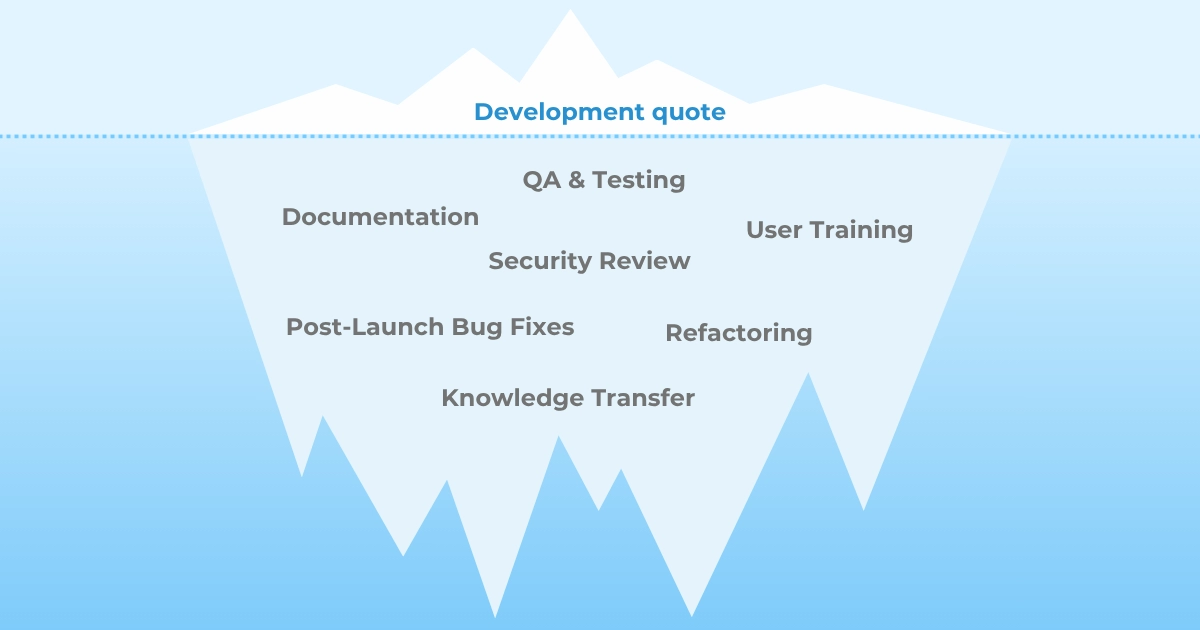
The development quote covers code. The items that regularly don’t make it in include: quality assurance, documentation, security review, user training, post-launch bug fixes, and refactoring when business processes change.
In our experience, none of these are edge cases. All of them do happen on real integration projects. Actual costs run 30–50% above initial estimates once they’re accounted for after contract signing.
Timeline: How Long Does a Custom Build Take
A minimum viable integration takes 2–3 months. A production-ready integration with bidirectional sync, field configuration, monitoring, and error handling: 4–6 months at minimum.
Teams unfamiliar with Salesforce Scripted REST APIs or Jira’s webhook model add 30–50% to every estimate. Meanwhile, a connector installs in 7 minutes from AppExchange and can be tested seamlessly with 30 day trial period.
Connect Jira and Salesforce in Minutes
Use Jira Connector for Salesforce by Peeklogic PRO to connect Salesforce and Jira in minutes. Create, link, search, and sync Jira issues from Salesforce with a ready-made AppExchange solution.
Who You Need on the Team
Realistically, the build requires at least four roles:
- a Salesforce developer with Apex and REST API experience;
- someone making architectural decisions about event queuing, conflict resolution, and scale;
- a QA engineer testing across both platforms simultaneously;
- a Jira administrator configuring the receiving side.
If that team exists in-house, the cost is opportunity cost. Every sprint they spend on integration infrastructure is a sprint they’re not spending on your product. If you’re outsourcing, agency margins add to already significant development hours.
And after launch, someone inherits the integration. They monitor it, debug it, and get the alert when something breaks. That role doesn’t expire.
What Happens After Launch: Ongoing Support and Maintenance
Salesforce ships three major releases per year: Spring, Summer, Winter. Each one introduces API changes that require review and testing against your integration. Jira’s release cycle creates the same pressure from the other side.
Annual maintenance for a custom Salesforce-Jira integration could run 112–240 hours per year.
| Activity | Est. Hours/Year |
| Salesforce API version updates | 8–16h |
| Jira release compatibility | 16–32h |
| Bug fixes and edge case handling | 32–60h |
| Security patches and credential management | 8–16h |
| Feature additions and evolving requirements | 40–100h |
| Documentation and knowledge transfer | 8–16h |
| Total annual maintenance | 112–240h/year |
At $100–150/hour, that costs $11,000–$36,000 per year, every year, in maintenance alone.
Then there’s the knowledge problem. The engineer who built the integration understands how it works. When they leave, that understanding leaves with them. “Nobody knows why this works” is a standard condition for any custom integration running for more than 12 months without documentation.
How AI Has Changed Custom Development (and What It Hasn’t)
AI coding tools have shifted the economics of custom development, but they haven’t changed its scope.
GitHub Copilot, Claude, ChatGPT: these tools accelerate code generation. Boilerplate, standard API calls, repetitive patterns; AI produces these faster than a developer writing from scratch. A realistic estimate puts the reduction in active coding time at 20–30%.
Three things don’t move:
- Architectural decisions. How to handle write conflicts in a bidirectional sync, how to structure the event queue, whether to build for Jira Cloud or Data Center: these require judgment about the specific business context. AI generates code for a specified architecture, but specifying the architecture correctly is still human work.
- Business logic. The rules about which fields map to which object, under which conditions, with which exceptions: that knowledge lives with people who understand the business. AI implements specified logic. Getting the specification right is still human work.
- Post-launch ownership. Monitoring production failures, debugging sync issues, testing compatibility with Salesforce’s next release: these remain human tasks.
AI has made custom development faster and modestly cheaper. The scope of a production-grade Salesforce-Jira integration is the same as it was.
What a Ready-Made Connector Offers Instead
Peeklogic Connector ships with the integration foundation already built. Installation runs through Salesforce AppExchange.
Authentication, bidirectional sync, webhook handling, error management, and field mapping configuration: these come with the product. The architecture is already built; our customers only need to configure it to suit their needs.
Want to see the connector in action?
Book a demo with Peeklogic to discuss your Salesforce and Jira workflow and see how the connector can support your team.
Setup in Minutes, Not Months
A fresh install takes 7 minutes. The integration foundation ships with the product. Our customers connect the platforms and configure how they behave, but the work ends there. The seven most common workflows teams actually need take 12–18 hours to configure in total, across all seven. A complete setup, thus, takes a few hours to a few days.
Built-In Support, Updates, and Compatibility
When Salesforce ships its Spring release, Peeklogic’s team tests compatibility and ships updates. Same process for every Jira release. Customers don’t track release schedules for two enterprise platforms or run their own compatibility test cycles.
Your engineering team would have to maintain the integration they built. The Peeklogic Connector is maintained by the team that built it.
Transparent Pricing with No Hidden Costs
Peeklogic Connector starts at $20/month.
Against $15,000–$100,000+ upfront and $11,000–$36,000/year in maintenance, that’s a calculation that takes about 30 seconds in front of a budget committee.
Custom Build vs Ready-Made Connector: Side-by-Side Comparison
Put the two paths side by side and the arithmetic is straightforward. These are the factors that most teams weigh when making this decision:
| Custom Build | Peeklogic Connector | |
| Setup time | 4–6+ months | Under 30 minutes |
| Initial cost | $15,000–$100,000+ | From $20/month |
| Team required | SF developer, architect, QA, Jira admin | No technical team needed |
| Annual maintenance | 112–240h/year ($11k–$36k+) | Included in subscription |
| Platform updates | Manual review each release | Handled by Peeklogic |
| AI impact on cost | Reduces build time ~20–30%; scope unchanged | Not applicable |
| Time to first value | Months | Hours |
| Risk profile | Knowledge dependency, scope creep, maintenance debt | Vendor dependency, roadmap alignment |
AI tools can reduce initial custom development time by 20–30%, which narrows the gap on paper. But AI-assisted development still gets billed as developer time. And the maintenance equation doesn’t change: three Salesforce releases per year, Jira releasing independently, someone owns that compatibility work every cycle. Over the years, the total cost of a custom build outpaces a connector subscription by an order of magnitude.
Real-World Use Cases
The gap between the two paths becomes most visible when real business workflows enter the picture. Most teams need more than just connected platforms; they need specific automations running on top: notifications when statuses change, fields syncing conditionally, records updating across both systems automatically.
With the Peeklogic Connector, most of these take 1–2 hours to configure. Peeklogic also provides implementation support, so in many cases customers don’t configure the use cases themselves.
The seven scenarios below were collected from real customer requirements during active deployments. Each one is a workflow a team specified, waited for, and put into production.
| Use Case | With Peeklogic | Custom Build |
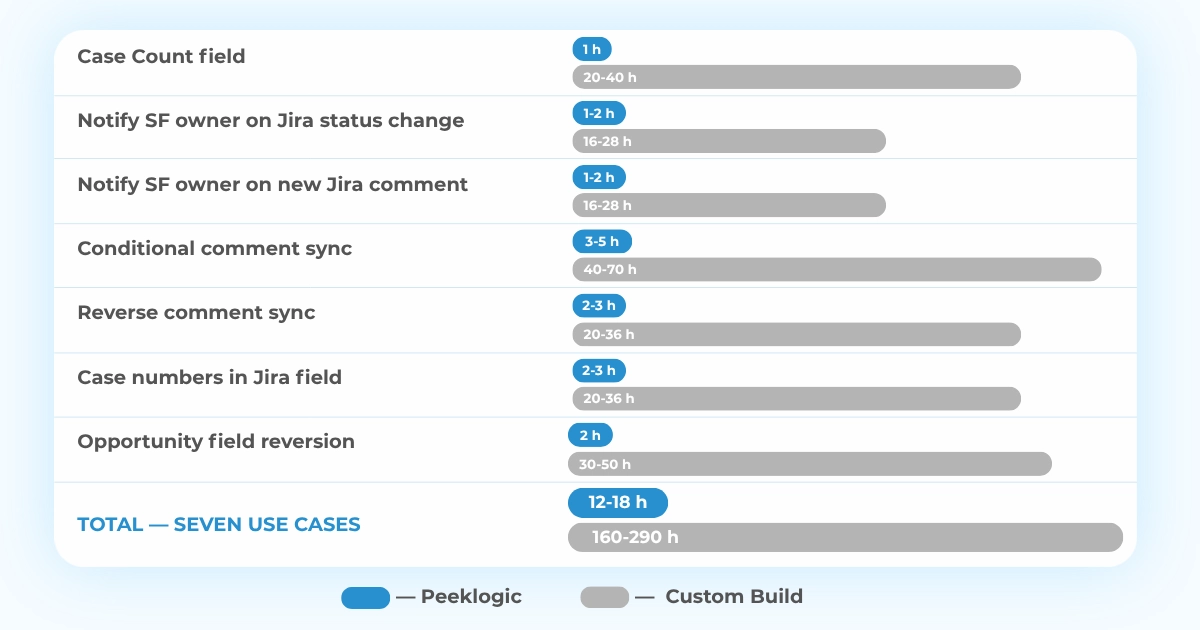
| Case Count field: a numeric field on the Jira Issue showing how many Salesforce Cases are linked, auto-updated whenever a Case is added or removed | 1h | 20–40h |
| Notify SF owner on Jira status change: when a linked Jira Issue status changes, the owner of the Salesforce record receives a notification | 1–2h | 16–28h |
| Notify SF owner on new Jira comment: when a new comment is added in Jira, the owner of the linked Salesforce record is notified | 1–2h | 16–28h |
| Conditional comment sync: while Jira status is not Closed, comments map to the Case “Request for More Information” field and notify the customer; once Closed, comments map to “Resolution Comments” and trigger a satisfaction survey | 3–5h | 40–70h |
| Reverse comment sync: when a linked Salesforce Case status changes, a corresponding comment is automatically created on the Jira Issue | 2–3h | 20–36h |
| Case numbers in Jira field: a field on the Jira Issue stores the list of linked Salesforce Case numbers, kept in sync on every link or unlink | 2–3h | 20–36h |
| Opportunity field reversion: when Jira-side edits are made to fields synchronized with a Salesforce Opportunity, the integration reverts them to Salesforce values; Salesforce is the source of truth | 2h | 30–50h |
| Total — seven use cases | ~12–18h | ~160–290h |
Those seven use cases sit on top of a working bidirectional integration foundation. Building that foundation from scratch adds 400–500 hours to the custom column. With Peeklogic, the foundation ships ready; customers configure the use cases and skip the rest.
Total effort for the same seven workflows: 12–18 hours with Peeklogic, 560–790 hours from scratch. That’s a 30–65× difference in budget, and then there’s timeline: one path delivers in days, while the other runs for months before the first workflow goes live.
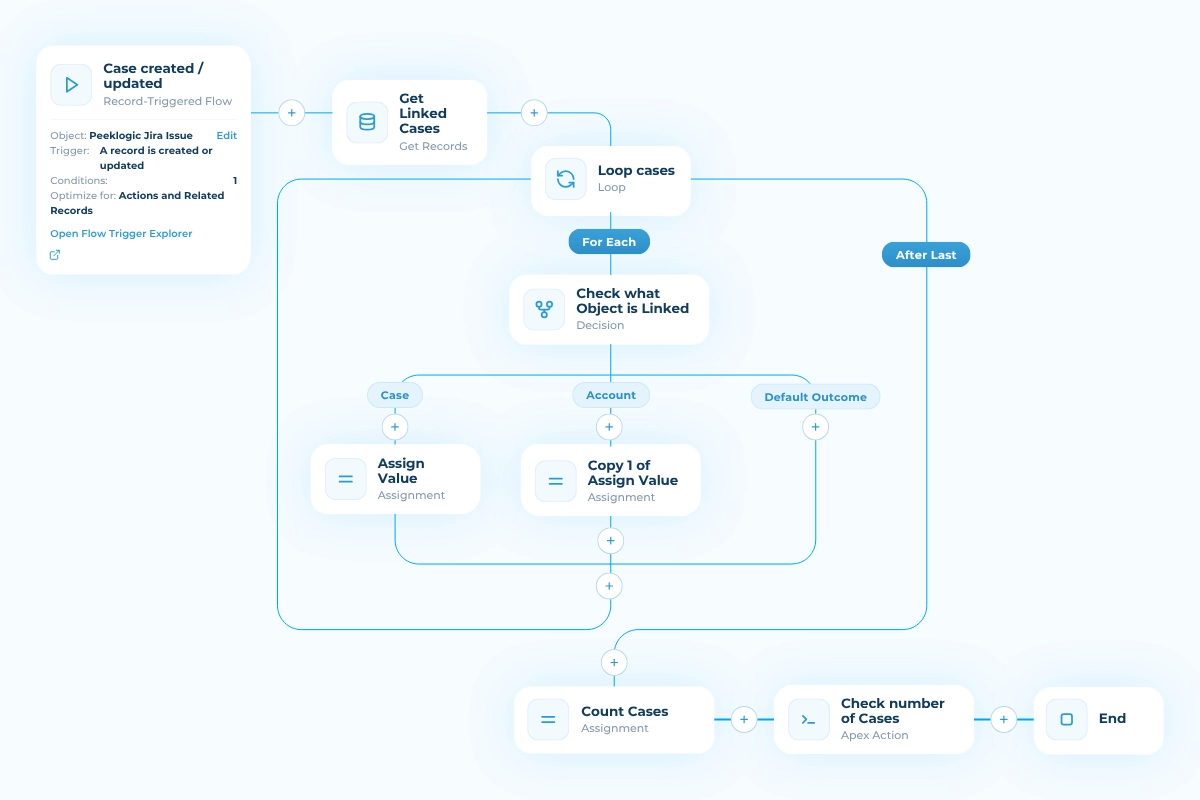
To make this concrete: below are two Salesforce Flows for Use Case 1 (Case Count field).
This one fires when a Case is created or updated:
…and this one fires when a Case is deleted:
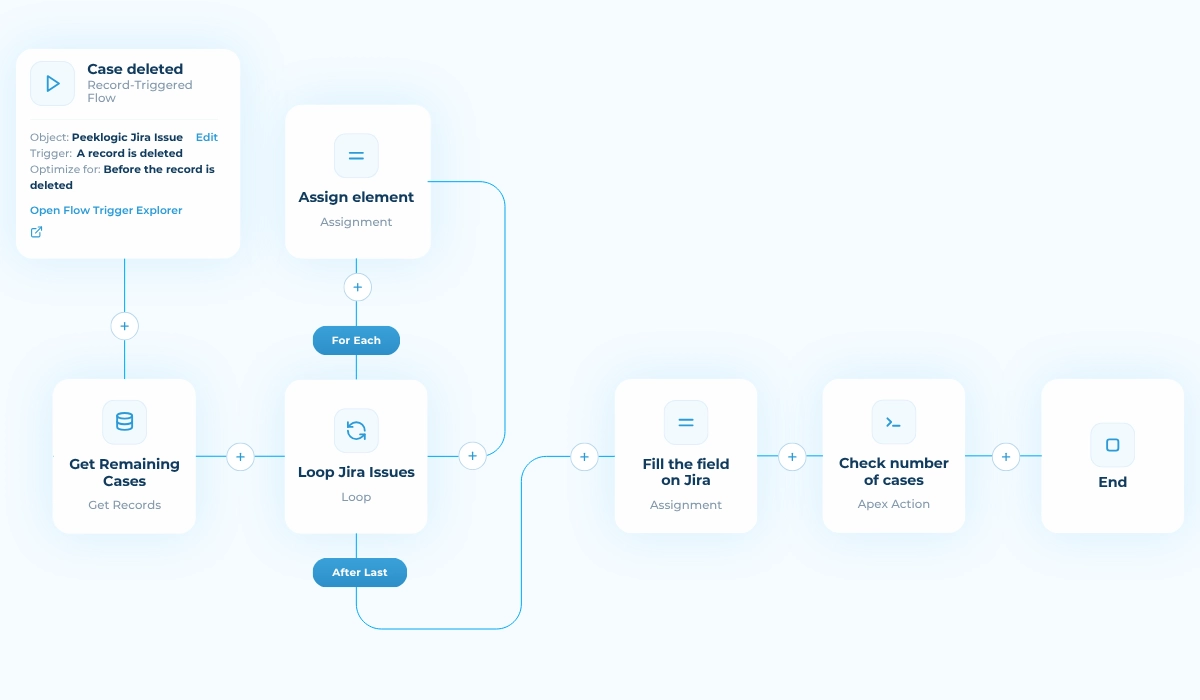
Together, they keep the count on the Jira Issue in sync automatically. Total configuration time for both: approximately 1 hour.
When Custom Integration Still Makes Sense
There are situations where custom development justifies its cost.
Organizations running multiple Salesforce orgs, custom middleware layers, or heavily non-standard Jira configurations can fall outside what off-the-shelf connectors accommodate. Standard connector products are built on standard object models; environments that deviate significantly may not map cleanly.
In heavily regulated industries, data residency or processing requirements sometimes rule out third-party SaaS products entirely. Custom code running within controlled infrastructure can meet compliance requirements a vendor product can’t certify against.
Some integrations need to implement proprietary business logic with no standard equivalent: conditional routing, cross-object approval workflows, exception handling that exists only within one company’s process. When the logic is specific enough, a configurable connector can’t reach it.
Some organizations prefer to own every layer of their infrastructure. For teams where vendor dependency is a strategic concern, building internally has organizational value beyond the technical outcome.
For most teams, none of these apply. For the ones where they do, the custom path is worth taking with a clear view of what it costs to build, maintain, and eventually hand off.
Which Approach Fits Your Team?
In short, for most standard Salesforce and Jira workflows, the connector wins 99 times out of 100.
The question isn’t even build vs buy. It’s how much of your engineering budget should go to infrastructure that isn’t your product.
The integration foundation alone takes 400–500 hours to build from scratch. With Peeklogic Connector, it ships ready. Seven common scenarios we’ve observed, that teams actually needed, took 12–18 hours to configure; the same scenarios run 560–790 hours on a full custom build.
That’s a 30–65× difference in effort before a single workflow is live.
For teams with complex enterprise environments (multiple orgs, specific compliance requirements, or proprietary logic no standard product handles), custom development may be justified. In that case, evaluate whether a connector handling the standard integration layer, with custom logic built on top, gets further than building the entire stack from scratch. All other things being equal, the company saves on architecture, build, QA, support, and annual maintenance overhead.
Besides:
Your engineering team, without a doubt, has more valuable things to build.
Not sure what the solution might look like in practice? Book a Demo to see the connector in action.
Frequently Asked Questions
A minimum viable integration: 2–3 months. A production-ready version with bidirectional sync, field configuration, and error handling: 4–6 months at minimum. Teams unfamiliar with either platform’s API model should add 30–50% to those timelines.
The minimum viable build runs 100–140 development hours, putting the starting cost at $15,000–$30,000 at standard Salesforce developer rates. Full-featured development runs 470–680 hours. Annual maintenance adds 112–240 hours per year on top.
AI tools reduce active coding time by roughly 20–30%. Architectural decisions, business logic specification, and post-launch maintenance are not meaningfully accelerated by current tools. The scope of the work doesn’t change.
Peeklogic’s team tests compatibility with each Salesforce and Jira release and ships updates. Customers don’t run their own compatibility cycles or track release schedules for either platform.
Peeklogic Connector starts at $20/month. Install directly from Salesforce AppExchange.


Salesforce Integration & Implementation | AppExchange and Custom Development | Data Migration
Contact us today!