July 23, 2026
 45 Views
Custom Salesforce-ServiceNow Integration vs Ready-Made Connector: What It Really Costs to Build vs Buy


ServiceNow runs IT for 85% of the Fortune 500. Salesforce runs sales and support for roughly the same share of the enterprise market. So it is somewhat ironic that connecting these two platforms is still, in most organizations, treated as a custom engineering project. Of course, these two platforms were built for completely different jobs. ServiceNow is for IT operations; Salesforce owns customer relationships. Both make sense in isolation, obviously, but the problem is that oftentimes what happens in IT directly affects customers, and the people managing those relationships have no visibility into what is happening on the other side. Statistically, employees lose 352 hours annually to IT-related inefficiencies like this.
There are two ways to fix it: build the integration from scratch, or take a ready-made connector and go live within hours. Both solve the problem; but the scale of what it actually costs to get there varies more than businesses realize.
The Salesforce-ServiceNow Integration Problem Is Different
Integrating Salesforce with a project management tool and integrating Salesforce with an enterprise ITSM platform are not the same category of problem.
ServiceNow is a platform that enterprises have spent years and significant budget configuring to match their specific IT operations model. Incident workflows, change management processes, CMDB relationships, scoped applications, custom tables: most production ServiceNow instances are heavily customized. That customization is the point, and it is exactly what makes building a standard integration on top of it genuinely complicated. The object model alone illustrates this. ServiceNow manages Incidents, Problems, Changes, Requests, and Configuration Items. Salesforce manages Cases, Accounts, Opportunities, and Contacts. These are not parallel structures with matching fields. They are two different organizational philosophies expressed in data. Mapping between them requires decisions and configuration. Add the fact that ServiceNow deployments vary between cloud and on-premise, and between multiple versions (Utah, Vancouver, Washington DC, Xanadu, Yokohama), and you have a target that moves in multiple dimensions at once.
What a Custom Salesforce-ServiceNow Integration Requires
At a bare minimum, a production-ready Salesforce-ServiceNow integration requires:
- OAuth 2.0 between two enterprise authentication systems
- Scripted REST APIs on the ServiceNow side
- Apex callouts on the Salesforce side
- Business Rules for event triggers
- object mapping logic between incompatible data models
- a retry queue for failed events and structured error handling
- a test suite that covers both platforms simultaneously
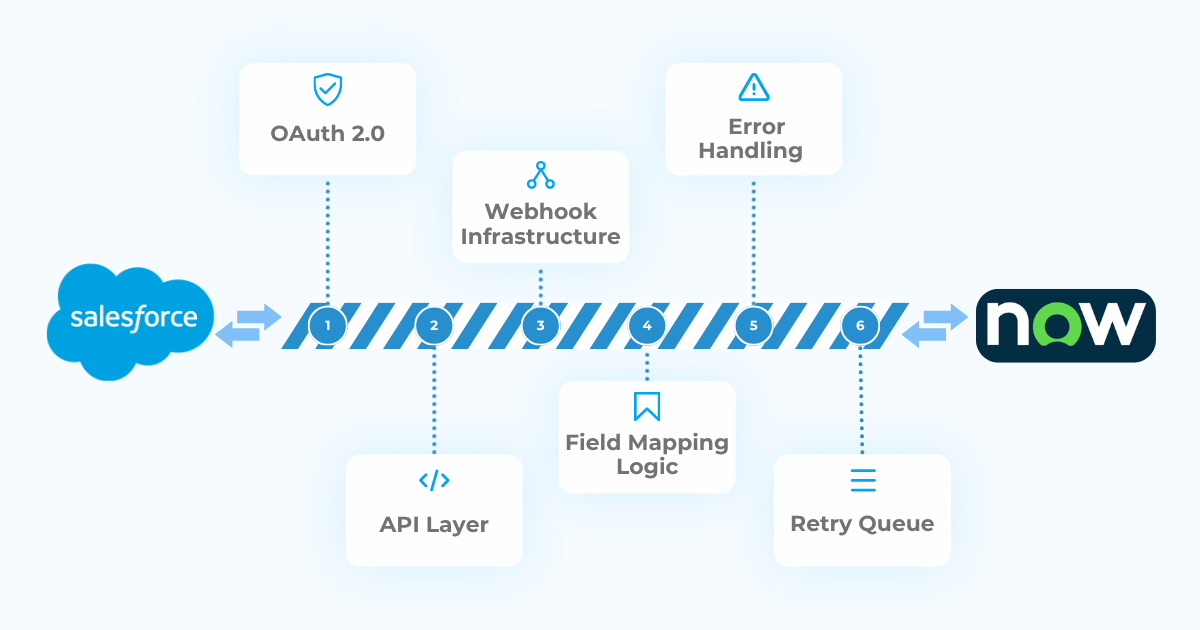 Let’s have a closer look at each one of these.
Authentication Between Two Enterprise Systems
OAuth between Salesforce and ServiceNow is more involved than it might seem. ServiceNow runs its own OAuth provider with its own token endpoint, scope configuration, and credential storage. Salesforce Named Credentials handle the Salesforce side, but the two systems need to agree on the handshake, and that agreement gets built manually. Setup runs 24-32 hours. Token refresh logic adds 8 hours. The next decision shapes the entire project: which ServiceNow environment are you building for? Cloud and on-premise instances authenticate differently, deliver events differently, and expose APIs differently. A solution designed for one does not port cleanly to the other.
Business Rules, Scripted REST APIs, and Event Handling
ServiceNow does not have native webhooks in the way most modern platforms do. Real-time event delivery runs through Business Rules and outbound REST messages. A Business Rule fires when a record is created or updated; the outbound message carries the payload to Salesforce. Each is a separate configuration, a separate failure point, and a separate maintenance surface. Outbound messages fail. Timeouts, payload limits, endpoint downtime: all routine in production. When that happens, the event needs to land somewhere. Without a queue, it disappears. Without retry logic, a single failure leaves records out of alignment indefinitely. Async event queue with retry handling: 32-40 hours. Error handling and audit logging: 16-24 hours.
Object Mapping Across Incompatible Data Models
A ServiceNow Incident has a State field with values like New, In Progress, On Hold, Resolved, Closed. A Salesforce Case has a Status field with values that differ by org configuration. These are not the same field with different labels. They represent different concepts in different process models. When a field in ServiceNow maps to a field in Salesforce, someone decides the rule. When the Incident state changes from In Progress to On Hold, what happens to the Case status? When a work note is added in ServiceNow, where does it go in Salesforce? When both systems update the same linked record within seconds of each other, which value wins? Each question has an answer in code. When the business process changes, so does the code. Field mapping and serialization: 16 hours minimum. Display configuration: 32-48 hours on top.
The Talent Problem
This is a cost most estimates leave out entirely. ServiceNow-certified developers are scarce in a way that Salesforce developers, Jira administrators, and most other platform specialists are not. The certification track is long, the platform has a steep learning curve, and the pool of people who’ve done this exact kind of work — Scripted REST APIs, cross-platform OAuth, GlideScript event handling — is narrow.
A production build needs at least four roles:
- A ServiceNow Certified Application Developer
- A Salesforce developer with Apex and REST API experience
- Someone making the architectural decisions
- A QA engineer who can test across both platforms at once
If those roles exist in-house, the cost shows up as opportunity cost — every sprint spent on integration plumbing is a sprint off the product roadmap. If you’re hiring for them, expect a longer search and higher rates than for most comparable roles: ServiceNow specialists command $125-200+ per hour, the going rate for certified expertise on a platform with a small practitioner base.
The cost doesn’t end at launch. Whoever inherits the integration becomes a single point of failure — and in a market this specialized, they’re a recruiting target. Custom integration logic is hard to hand off under the best of circumstances. Any integration running more than 12 months without documentation eventually reaches a point where nobody remembers why it works the way it does; with ServiceNow, finding someone who can even read the existing code takes longer than with almost any other platform.
The Real Cost of a Custom Salesforce-ServiceNow Integration
Here’s what that time actually buys, at two different levels of completeness:
- Minimum viable integration (OAuth, one-way sync, basic security): 100-140 development hours → $20,000-$40,000+ at $125-200/hour. This is a connected integration, not a usable one — no bidirectional sync, object configuration, search, or workflow.
- Full feature parity with a production-grade connector: 470-680 hours → $60,000-$140,000+.
Peeklogic Connector, by comparison, starts at $20/month.
Try Peeklogic ServiceNow Connector Free of Charge & Get One Extra Year for Free
Claim the OfferAnd that quote covers code only. It typically doesn’t include quality assurance, documentation, security review, user training, post-launch bug fixes, or the refactoring that follows when the business process behind the original field mapping changes six months later.
ServiceNow adds its own line items on top:
- ServiceNow Store certification: 40-80 hours of documentation, submission rounds, and remediation
- Scoped application licensing
- Upgrade testing for every new city release — not optional, a standing maintenance commitment starting the day the integration goes live
Actual project costs consistently run 30-50% above the initial estimate. 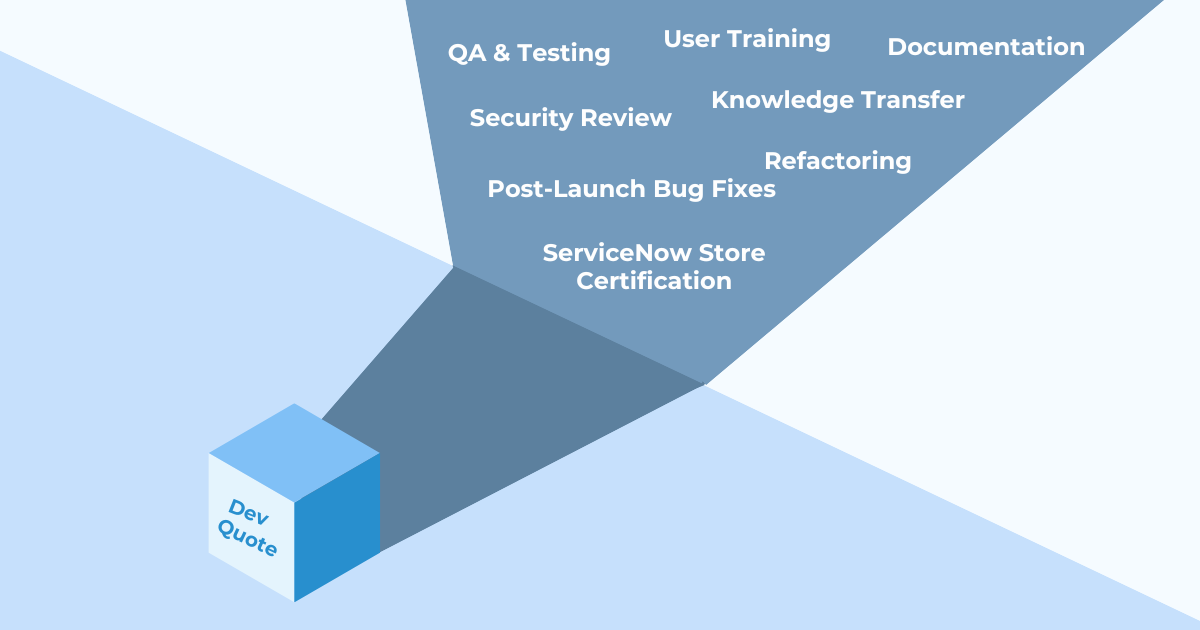
The Maintenance Trap
Each ServiceNow release is a major platform update. Each one can introduce changes to Scripted REST API behavior, Business Rule execution, or scoped application compatibility. The ServiceNow ecosystem has a term for what happens when an upgrade breaks something: it is expected. Not in the sense that it is acceptable, but in the sense that every organization with a production ServiceNow instance has a process for managing it. That process now needs to include your custom integration. Salesforce adds three major releases per year on top of that. Spring, Summer, Winter. Each one requires a review pass against your integration to verify nothing has changed on the Salesforce side. Annual maintenance for a custom Salesforce-ServiceNow integration can take up to 240 hours per year, broken down roughly like this:
| Activity | Est. Hours/Year |
| Salesforce API version updates | 8-16h |
| ServiceNow release compatibility | 16-32h |
| Bug fixes and edge case handling | 32-60h |
| Security patches and credential management | 8-16h |
| Feature additions and evolving requirements | 40-100h |
| Documentation and knowledge transfer | 8-16h |
| Total annual maintenance | 112-240h/year |
At $125-200/hour, that runs $14,000-$48,000 per year, every year. And that is the floor, not the ceiling, as the number does not include the cost of the upgrade itself breaking something unexpected, or the time to find a replacement if your ServiceNow developer leaves.
Where AI Fits (and Where It Doesn’t)
AI coding tools reduce active development time by roughly 20-30% on standard technology stacks. For ServiceNow, that number is smaller. GlideScript is a proprietary scripting language. AI models trained primarily on JavaScript, Python, and Java are less effective with GlideScript-specific patterns, ServiceNow API quirks, and platform-specific edge cases. The acceleration is real but lower than it would be for a Salesforce-only build or a standard REST integration. More importantly, the parts of the project that consume the most time and carry the most risk are not the parts AI accelerates. Architectural decisions about event handling, object mapping strategy, deployment environment compatibility: these require judgment about the specific business context. AI implements specified logic, but specifying it accurately is still human work. Post-launch maintenance does not compress, releases still ship, ServiceNow APIs still change. The integration still needs someone to own it.
What Peeklogic Connector Does Instead
The core value of a ready-made connector for ServiceNow is not primarily speed, though the speed difference is significant. It is that it removes the ServiceNow expertise requirement from the integration entirely. Authentication, bidirectional sync, Business Rule handling, object mapping, error management: these ship with the product. A Salesforce admin can configure the integration without knowing what GlideScript is. The connector is installed through the ServiceNow Store and Salesforce AppExchange. Configuration happens through a UI, not a development environment. When ServiceNow ships Washington DC, Peeklogic’s team tests compatibility and releases updates. When Salesforce ships Spring, same process. The customer does not track release notes for two enterprise platforms or schedule compatibility windows around city releases.
Want to see how Peeklogic Connector works?
Book a DemoCustom Build vs Ready-Made Connector: Side-by-Side
The factors below are the same ones any integration decision comes down to. With ServiceNow, most of them land harder than teams expect.
| Custom Build | Peeklogic Connector | |
| Initial cost | $20,000-$140,000+ | From $20/month |
| Setup time | 4-6+ months | Hours to days |
| ServiceNow expertise required | Certified SN Application Developer | None |
| Team size | 4+ specialized roles | No technical team needed |
| Annual maintenance | 112-240h/year ($14k-$48k+) | Included in subscription |
| City release compatibility | Manual testing each release | Handled by Peeklogic |
| AI impact | Reduces build time ~15-25% on GlideScript; scope unchanged | Not applicable |
| Store certification | +40-80h if required | Already certified |
| Time to first value | Months | Hours |
| Risk | Knowledge dependency, release risk, maintenance debt | Vendor dependency, roadmap alignment |
AI tools can reduce the initial development investment by 15-25% on a ServiceNow build, somewhat less than on a standard JavaScript or Apex project given GlideScript’s specificity. The remaining gap between a custom build and a connector subscription does not close. Maintenance costs accumulate regardless of how efficiently the original code was written, and someone still has to own every city release.
Real-World Use Cases
The seven use cases below are adapted from real Salesforce-Jira workflows documented with customers. The objects differ (Incident instead of Jira Issue, Work Notes instead of Jira comments), but the connector architecture and the configuration patterns are consistent. A notification trigger is a notification trigger regardless of which ITSM platform sits on either end.
| Use Case | With Peeklogic | Custom Build |
| Incident Count field: numeric field on the Salesforce Case showing how many linked ServiceNow Incidents exist, auto-updated on add or remove | 1h | 20-40h |
| Notify SF owner on Incident status change: when a linked Incident changes state, the Salesforce Case owner receives a notification | 1-2h | 16-28h |
| Notify SF owner on new work note: when a work note is added in ServiceNow, the linked Case owner is notified | 1-2h | 16-28h |
| Conditional work note sync: while Incident state is not Resolved, work notes map to the Case “Request for More Information” field; once Resolved, they map to “Resolution Comments” and trigger a satisfaction survey | 3-5h | 40-70h |
| Reverse comment sync: when a Salesforce Case status changes, a corresponding work note is automatically created on the linked ServiceNow Incident | 2-3h | 20-36h |
| Case numbers in Incident field: a field on the ServiceNow Incident stores linked Salesforce Case numbers, kept in sync on every link or unlink | 2-3h | 20-36h |
| Opportunity field reversion: when ServiceNow-side edits are made to fields synchronized with a Salesforce Opportunity, the integration reverts them to Salesforce values | 2h | 30-50h |
| Total — seven use cases | ~12-18h | ~160-290h |
Those seven workflows sit on top of the integration foundation. Building that foundation from scratch takes 400-500 hours. With Peeklogic, it ships ready. Total: 12-18 hours with Peeklogic, 560-790 hours from scratch. One path delivers in days; the other runs for months before the first workflow goes live. Not sure what the out-of-the-box solution might look like in practice?
Try it for free or book a demo to see the connector in action.
When Custom Development Is the Right Call
There are organizations for whom the custom path is the right one. On-premise ServiceNow deployments with strict data sovereignty requirements often cannot use cloud-based connectors at the integration layer. Custom code running entirely within controlled infrastructure can meet requirements that a SaaS product cannot certify against. Heavily customized ServiceNow instances: extended tables, non-standard CMDB structures, scoped applications that alter core object behavior. These may fall outside what a standard connector can handle cleanly.
When the instance deviates significantly from vanilla ServiceNow, mapping to a standard connector schema requires workarounds that may cost more than they save. Organizations in regulated industries (financial services, healthcare, government) sometimes face compliance requirements that make third-party software at the integration layer subject to additional scrutiny. When that scrutiny is significant, building internally may be the more defensible path. Enterprises with a dedicated ServiceNow Center of Excellence (certified developers, mature release management, formal change control) have already absorbed the infrastructure that makes custom development viable long-term. For those teams, building one more integration is not a new capability, but a backlog item. For everyone else, the calculus is straightforward.
Which Path Fits Your Organization?
For standard ITSM-to-CRM workflows: the connector, by a wide margin. ServiceNow expertise is scarce, and the maintenance commitment is real. The gap between a connected integration and a usable one is 400-500 hours of foundation work before a single business workflow is configured. Peeklogic Connector removes that gap entirely and eliminates the ServiceNow certification requirement from the project.
For teams with genuinely complex environments: on-premise infrastructure, heavily customized instances, regulatory constraints that restrict third-party software at the integration layer, custom development may be justified. In that case, evaluate whether a connector handling the standard layer with custom logic on top gets further than building the entire stack from scratch. The question is not only build vs. buy, but rather, how much of your engineering capacity should go to infrastructure that is not your product, staffed by specialists who are harder to find and more expensive to hire than almost anyone else in the enterprise software ecosystem.
Wondering what the out-of-the-box solution might look like in practice?
See Peeklogic in action
Book a demoFrequently Asked Questions
ServiceNow is significantly more complex as a development platform. It uses GlideScript, a proprietary scripting language. Its release cycle introduces breaking changes more frequently. It offers on-premise deployment options that add architectural complexity. Certified ServiceNow developers command higher rates and represent a smaller talent pool than Salesforce or Jira specialists.
A minimum viable integration runs 100-140 development hours. At ServiceNow specialist rates of $125-200/hour, that puts the starting cost at $20,000-$40,000+. Full-featured development runs 470-680 hours. Annual maintenance adds 112-240 hours on top.
A minimum viable integration: 2-3 months. A production-ready version with bidirectional sync, object mapping, and error handling: 4-6 months at minimum. Teams unfamiliar with ServiceNow’s development model should add 30-50% to those timelines.
Each city-named release can introduce changes to Scripted REST APIs, Business Rule behavior, or scoped application compatibility. A custom integration requires a compatibility review and testing pass after each release. This is included in the 16-32 hours of annual ServiceNow release compatibility maintenance.
No. Configuration runs through a UI available to Salesforce admins. No GlideScript knowledge is required. Peeklogic’s team handles compatibility with ServiceNow and Salesforce releases.


Salesforce Integration & Implementation | AppExchange and Custom Development | Data Migration
Contact us today!