August 03, 2026
 170 Views
Custom Salesforce-Azure DevOps Integration vs Ready-Made Connector: What It Really Costs to Build vs Buy


Azure DevOps has one of the best-documented REST APIs in the developer tools space. Salesforce has spent two decades building out its own. So when engineering and revenue teams finally decide they need these two connected, the read on the room is usually optimistic.
Both platforms are mature. Both are well documented. This one should be manageable. Right?
Well…
On the surface, it is true. But the problem is that “both have good APIs” and “the integration is straightforward” are two very different claims.
Almost none of the difficulty here sits inside an individual API call. It sits in the space between two systems that describe work in ways that were never designed to line up. Teams usually find that out after the budget is approved.
Roughly 82% of organizations with 1,000+ employees run DevOps practices in some form. Most of those companies also run Salesforce. The two tools sit in the same building, on the same floor sometimes, and connecting them is still treated as a custom engineering project in most places.
So below is a breakdown of what that project costs, who has to build it, and what the alternative looks like.
Where the Difficulty Actually Lives
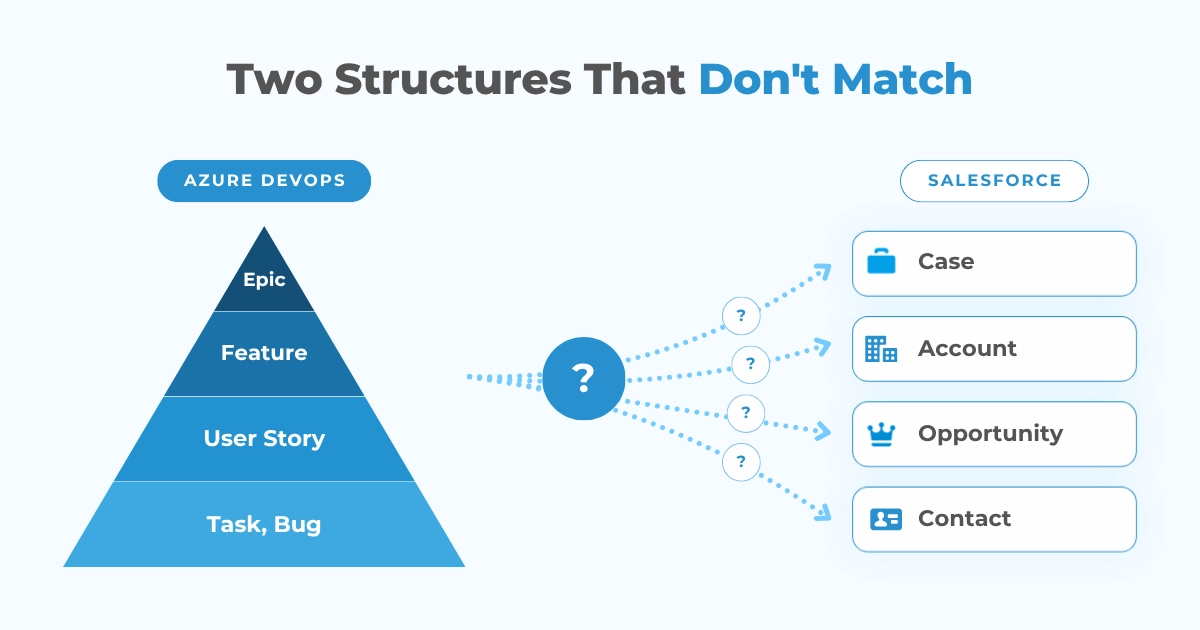
Epics contain Features. Features contain User Stories. User Stories contain Tasks and Bugs. That is the Azure DevOps Work Item hierarchy, and it makes perfect sense right up until someone asks which of those corresponds to a Salesforce Case.
There is no correct answer. It depends on the process template the ADO project runs. Agile, Scrum, and CMMI each define their own Work Item types, with different field names for what is effectively the same idea. A team on Scrum tracks Product Backlog Items. A team on Agile tracks User Stories. Same concept, different schema, and the integration has to know which one it is talking to before it can do anything useful.
Thus the first architectural decision of the project is one that almost never appears in the original scope.
Area Paths cause trouble in a quiet way. They are how ADO groups Work Items by team, and by default, a query that pulls Work Items from a project pulls every single one, including items belonging to teams who have no idea an integration exists. Scoping that correctly is not difficult. Realizing it needs scoping tends to happen right after the first sync run, when several thousand irrelevant records land in Salesforce.
Authentication has its own fork in the road. Azure DevOps supports Personal Access Tokens and OAuth. PATs are faster to implement, which is precisely why teams reach for them. They also expire on a schedule, they inherit the permissions of whoever generated them, and when that person leaves the company the integration stops working with no obvious explanation attached. OAuth avoids all of that and costs more hours up front.
And another thing that catches teams off guard? Every ADO REST call requires an explicit api-version parameter. Pin a version and Microsoft eventually deprecates it. Leave it loose and behavior shifts underneath you.
Either way, someone is watching that changelog.
What a Custom Build Actually Requires
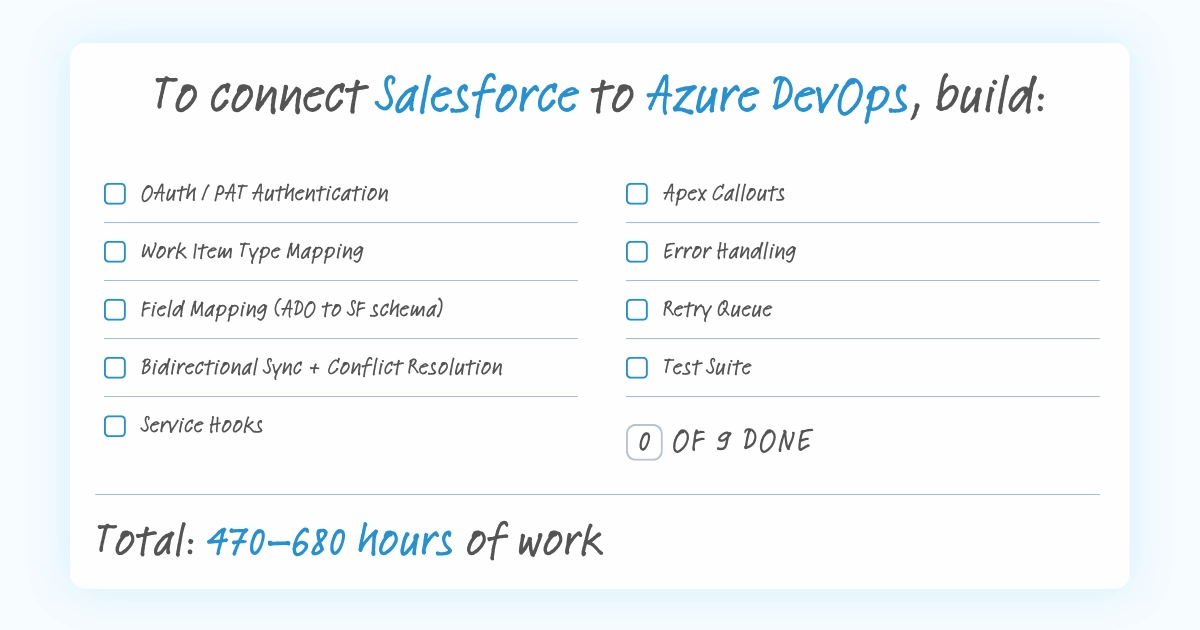
Here is the build list, put shortly:
- Authentication for both platforms
- Work Item type mapping
- Field mapping across two schemas (that were never meant to align)
- Bidirectional sync with conflict resolution
- Service Hooks to catch ADO events in real time
- Apex callouts on the Salesforce side
- Error handling
- A retry queue
- A test suite that has to exercise both systems at once.
That makes nine items in total. And obviously, each of them is a small project of its own.
Authentication and API Versioning
The authentication choice shapes everything that follows it. A Personal Access Token gets a prototype working by Friday. A PAT in production is a dependency on one employee’s account staying active and one expiry date being remembered by someone.
OAuth 2.0 is the defensible option. It means building the authorization flow, handling token refresh before every call, and storing credentials on the Salesforce side through Named Credentials.
Setup runs 24-32 hours. Refresh logic adds 10+ more.
Work Item Mapping and Field Translation
A Salesforce Case carries a Status, a Priority, a Subject, and whatever custom fields the org has accumulated over the years. An Azure DevOps Bug carries a State, a Priority, a Title, Repro Steps, and Acceptance Criteria. A User Story has Story Points, which a Bug does not. A Task has an Activity field, which neither of the others has.
So this is not field-to-field translation. It is translation between two working theories of how software work should be described, and someone has to arbitrate. Which ADO Work Item type corresponds to which Salesforce object. Which fields carry over. What happens when a field exists on one side and has no counterpart on the other. How picklist values reconcile when the option sets do not match.
Every one of those answers becomes code. When the business process shifts, the code shifts with it.
Field mapping and serialization takes 16 hours, minimum. Display configuration adds another 32-48 on top.
Service Hooks and the Events That Quietly Disappear
Azure DevOps pushes events through Service Hooks. A Work Item gets created or updated, the hook fires, a payload lands at whatever endpoint you configured. Cleaner than a raw webhook, and it comes with a catch.
Service Hooks do not retry on their own. If Salesforce is unavailable at the moment a hook fires, that event is gone. There is no queue behind it and no notification that anything failed. Any production integration therefore needs its own buffer: something that receives the payload, holds it when delivery fails, and retries on a schedule. Skip it, and the integration silently drops events during every maintenance window.
Async event queue with retry handling takes about 30-40 hours. Structured error handling and logging adds up to another 20+ hours.
Who Actually Builds This
The people who know Azure DevOps well usually sit in engineering. The people who know Salesforce well usually sit in revenue operations. The overlap is… rare. And the hard calls in this build are exactly the ones that need both perspectives in the room at the same time.
Deciding which Work Item type corresponds to a Case is a question about how engineering plans its sprints and how support escalates a customer issue. Nobody answers it well from one side of the org chart.
Realistic staffing: a Salesforce developer comfortable with Apex and REST callouts, someone fluent in the ADO API and its data model, an architect owning decisions about event handling and conflict resolution, and QA capable of testing across both platforms. Three to four people, at least two of them with real platform depth.
In-house, the price is also opportunity cost. Those sprints go to metaphorical plumbing instead of product. Outsourced, you are paying agency rates for a skills combination that takes a while to source.
And after go-live, someone owns this entire thing. They get the alert when Service Hooks start failing overnight. They run the investigation when two records drift apart and a customer notices before anyone internal does. That commitment has no end date.
The Real Cost
A minimum viable integration runs 100-140 hours. At $100-150 an hour, call it $15,000 to $30,000.
What that money buys is two connected systems. Work Item type configuration is out of scope. So is bidirectional sync, field mapping through an interface, search, record linking, and essentially every part of the daily workflow the team was asking about when they raised the idea.
Feature parity with a production-grade connector takes 470-680 hours, which lands the full build somewhere between $70,000 and $100,000.
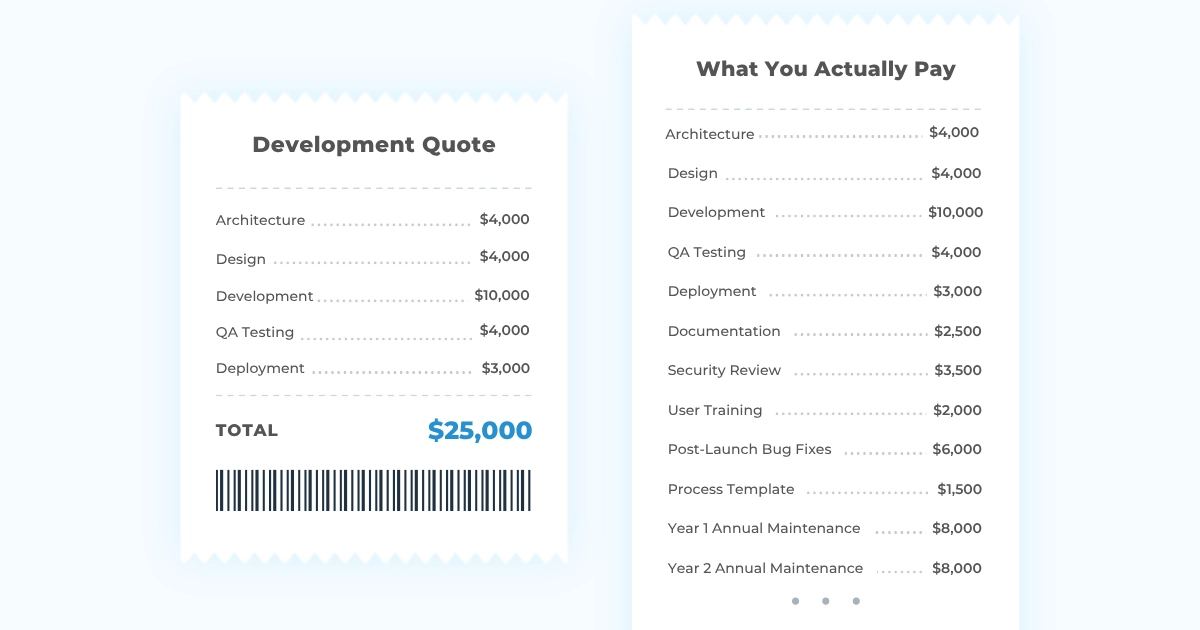
And keep in mind, all of those numbers describe code. The quote rarely covers what surrounds the code: QA, documentation, security review, training for the people who will use it daily, the first real bug three weeks after launch, and the refactor that arrives when engineering switches process templates or reshuffles Area Paths after a reorg.
Which is why real project costs land 30-50% above the original estimate.
Peeklogic Connector for Azure DevOps starts at under $2000/year, and right now, for a limited time only, the second year comes free.
Get one year of Peeklogic Connector at no additional cost
Claim the limited-time offerThe Maintenance Reality
Microsoft ships changes to the ADO REST API on its own schedule, deprecates old versions on another, and adjusts Service Hook behavior when it sees fit. Salesforce ships three major releases a year. Each of those events is a reason to verify the integration still does what it did last month.
Annual maintenance adds up to anything between 110 and 240 hours:
| Activity | Est. Hours/Year |
| Salesforce API version updates | 8-16h |
| Azure DevOps API compatibility | 16-32h |
| Bug fixes and edge case handling | 32-60h |
| Security patches and credential management | 8-16h |
| Feature additions and evolving requirements | 40-100h |
| Documentation and knowledge transfer | 8-16h |
| Total annual maintenance | 112-240h/year |
At $100-150 an hour, that is $11,000 to $36,000 a year. Every year, indefinitely.
But the platform releases are the predictable half of this. The other half comes from inside the company. Engineering switches process templates. Someone adds three custom Work Item fields. A reorg reshuffles the Area Path hierarchy. None of that is a platform event; it is just an organization behaving normally.
And each time it happens, the integration needs updating to match.
Does AI Make Custom Integrations Cheaper?
AI coding tools cut active development time by roughly 20-30% on standard REST integration work, and Azure DevOps is a favourable case for them. The APIs are well documented, the request patterns are conventional, and code generation for ADO calls, Apex callouts, and error handling genuinely benefits.
What does not compress: the Work Item mapping decisions, the process template question, the conflict resolution rules, and everything that happens after launch. Those depend on how a specific engineering team works and how a specific support team escalates, which is not information any model has.
So AI has made the build faster. The decisions and the maintenance commitment sit exactly where they were.
What Peeklogic Connector Does (So You Don’t Have To)
Peeklogic Connector for Azure DevOps arrives with the integration foundation already built. Authentication, bidirectional sync, Work Item type configuration, field mapping, Service Hook handling, error management: all of it ships with the product, configured through an interface rather than assembled in an IDE.
Install Peeklogic Connector on AppExchange and let it do all the heavy lifting
Try the ConnectorInstallation runs through Salesforce AppExchange, with a 30-day trial period included. The architecture decisions have already been made and tested against both platform:
From Install to First Synced Record
Configuration happens in Salesforce Flows and the connector interface. Work Item type mapping, field selection, sync direction: these are choices made in a UI, and changing one later means changing a setting.
Naturally, that shifts who can do the work. A Salesforce admin can configure the integration end to end without writing a callout or reading ADO API documentation.
Updates and Compatibility
When Microsoft deprecates an ADO API version, Peeklogic updates the connector. When Salesforce ships Summer, the same thing happens. Customers do not read two sets of release notes or schedule their own compatibility testing windows.
The product is maintained by the team that built it, which means the knowledge stays in one place even when individual people move on.
Pricing You Can Predict
Peeklogic Connector starts at $2000/year against $15,000-$100,000+ upfront and $11,000-$36,000 a year in maintenance. Frankly, that is a slide that presents itself.
It is also a subscription line that stays a subscription line. The number behaves the same in year three as it did in month one.
Custom Build vs Ready-Made Connector: Side-by-Side
The table below covers the factors this decision usually involves:
| Custom Build | Peeklogic Connector | |
| Initial cost | $15,000-$100,000+ | From $20/month |
| Setup time | 4-6+ months | Hours |
| Work Item type config | Coded per process template | UI configuration |
| Team required | SF developer, ADO specialist, architect, QA | No technical team needed |
| Annual maintenance | 112-240h/year ($11k-$36k+) | Included in subscription |
| API version updates | Manual review each deprecation | Handled by Peeklogic |
| AI impact | Reduces build time ~20-30%; scope unchanged | Not applicable |
| Process template changes | Requires integration update | Handled automatically |
| Time to first value | Months | Hours |
| Risk | Knowledge dependency, scope creep, maintenance debt | Vendor dependency, roadmap alignment |
AI narrows the first row by 20-30%, and for Azure DevOps that reduction is considerable. Everything below the first row stays where it is. Maintenance accumulates on its own schedule regardless of how efficiently the original code was written, and someone still has to read the ADO changelog every quarter.
Real-World Use Cases
The difference between the two paths gets most visible once actual business workflows enter the picture.
Connected platforms are the starting line. What teams ask for next is automation on top: notifications when a status moves, fields that sync under specific conditions, records that update themselves across both systems.
With the connector and Salesforce Flow Builder, most of these take one to two hours to configure. Peeklogic also builds them for customers on request, which means the practical number is frequently zero hours of internal effort.
The seven scenarios below come from real Salesforce-Jira customer workflows we documented in detail. Objects differ here (Azure DevOps Work Items rather than Jira Issues), though the configuration patterns and effort ratios hold across connector implementations.
| Use Case | With Peeklogic | Custom Build |
| Work Item Count field: numeric field on the Salesforce Case showing how many linked Azure DevOps Work Items exist, auto-updated on add or remove | 1h | 20-40h |
| Notify SF owner on Work Item status change: when a linked Work Item state changes, the Salesforce Case owner receives a notification | 1-2h | 16-28h |
| Notify SF owner on new Work Item comment: when a comment is added in Azure DevOps, the linked Case owner is notified | 1-2h | 16-28h |
| Conditional comment sync: while Work Item state is not Resolved, comments map to the Case “Request for More Information” field; once Resolved, they map to “Resolution Comments” and trigger a satisfaction survey | 3-5h | 40-70h |
| Reverse comment sync: when a Salesforce Case status changes, a corresponding comment is automatically created on the linked Work Item | 2-3h | 20-36h |
| Case numbers in Work Item field: a field on the Work Item stores linked Salesforce Case numbers, kept in sync on every link or unlink | 2-3h | 20-36h |
| Opportunity field reversion: when ADO-side edits are made to fields synchronized with a Salesforce Opportunity, the integration reverts them to Salesforce values | 2h | 30-50h |
| Total, seven use cases | ~12-18h | ~160-290h |
* Adapted fromSalesforce-Jira Use Cases based on Peeklogic internal data. Object names updated for Azure DevOps; effort ratios are consistent across connector implementations.
All seven of those sit on top of a working bidirectional foundation. Building that foundation from scratch adds 400-500 hours to the right-hand column. With the connector, it ships ready, so the customer configures the seven and skips the rest.
Total effort for the same set of workflows: 12-18 hours with Peeklogic against 560-790 hours from scratch.
That’s roughly a 30-65x difference, and that is before accounting for the calendar.
One path delivers in days. The other runs for months before anyone sees a single working workflow.
When Custom Development Makes Sense
Let’s be real: all of the above being said, custom is still the right answer for some organizations.
Non-standard ADO environments qualify here. Heavily modified process templates, complex Area Path hierarchies, custom Work Item types that depart significantly from the defaults, or multi-organization setups where Work Items need to move across ADO organization boundaries. When the environment is unusual enough, a standard connector may not map onto it cleanly.
Strict data residency requirements are another. If policy prohibits third-party software at the integration layer, custom code inside controlled infrastructure can satisfy requirements that no SaaS product will certify against.
Then there are teams that want to own every layer of their stack as a matter of principle. Vendor dependency may feel like a legitimate strategic concern. And obviously, for some engineering organizations building internally carries value that does not show up in an hours estimate.
For most teams, though, none of this applies. The typical case is an engineering group on one of the three default process templates connected to a reasonably standard Salesforce org. In that scenario the connector wins on every level that matters.
Which Approach Fits Your Team?
For standard engineering-to-CRM workflows, the connector usually wins, and not by a small margin.
The foundation alone runs 400-500 hours to build. The most requested use cases take 12-18 hours to configure with Peeklogic, against 560-790 hours on a full custom build. Architecture, build, QA, and the annual maintenance line all come off the table, and the integration is running the same day it is installed.
For teams with genuinely unusual ADO environments or hard compliance constraints, custom development may be justified. Even then, a connector handling the standard layer (with custom logic built on top) often gets further than building the whole thing from zero.
Because the real question is never build versus buy. It is how much engineering capacity should go to infrastructure that is not your product.
Your team, obviously, has better things to build.
Wondering what the out-of-the-box solution might look like in practice? Book a demo and see Peeklogic Connector in action!
Book a DemoFrequently Asked Questions
A minimum viable integration takes 2-3 months. A production-ready version with bidirectional sync, Work Item type mapping, and error handling takes 4-6 months. Teams unfamiliar with the ADO API model or Salesforce Apex should add 30-50% to those timelines.
The minimum viable build runs 100-140 development hours, putting the starting cost at $15,000-$30,000. Full-featured development runs 470-680 hours. Annual maintenance adds 112-240 hours per year on top of that.
It depends on the process template the ADO project runs (Agile, Scrum, or CMMI) and how the team has configured its Work Item types. A Salesforce Case commonly maps to an ADO Bug or User Story, but the field-level mapping requires decisions about which ADO fields correspond to which Salesforce fields, what happens when one side has no counterpart, and how picklist values reconcile. Those decisions get made during implementation.
AI tools cut active coding time by roughly 20-30%, and Azure DevOps is a favourable case given how well its APIs are documented. Architectural decisions, Work Item mapping logic, and post-launch maintenance see no meaningful acceleration.
Peeklogic tests compatibility against ADO API updates and Salesforce seasonal releases, then ships connector updates. Customers do not run their own compatibility cycles or track ADO API deprecation schedules.


Salesforce Integration & Implementation | AppExchange and Custom Development | Data Migration
Contact us today!