August 04, 2026
 167 Views
Custom Salesforce-NetSuite Integration vs Ready-Made Connector: The True Cost of Build vs Buy


Salesforce and NetSuite sit at opposite ends of the same transaction: Salesforce owns the part where your team negotiates the deal, NetSuite owns everything after the signature. But the problem is that each transaction has to cross between them (and remain intact).
So somebody has to carry it over manually, and manual entry on financial fields goes wrong on up to 4% of occasions.
Which brings you to the question: build the integration, or buy one. This article explains what separates those two paths, and what each of them costs – in time, money, and the work your team isn’t doing in the meantime.
What Moves Between Salesforce and NetSuite
A wrong field in a Jira ticket is a nuisance. A wrong field in an invoice is a financial event. Every decision in this article is downstream from this difference.
Let’s start with the object list, because that’s what actually sets the size of the build.
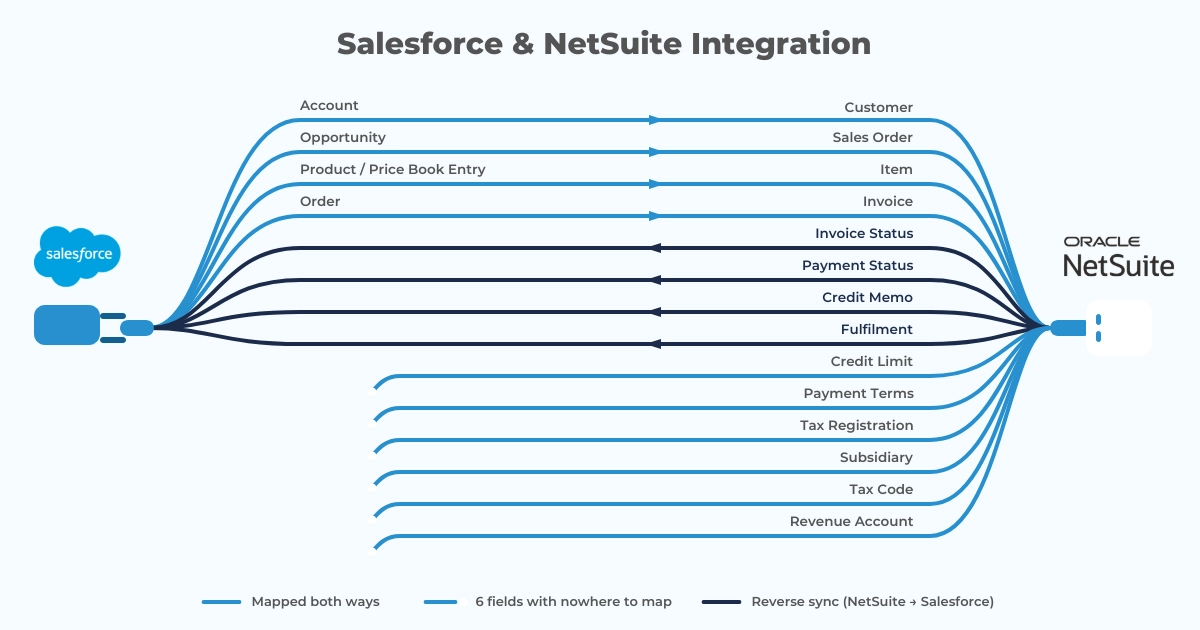
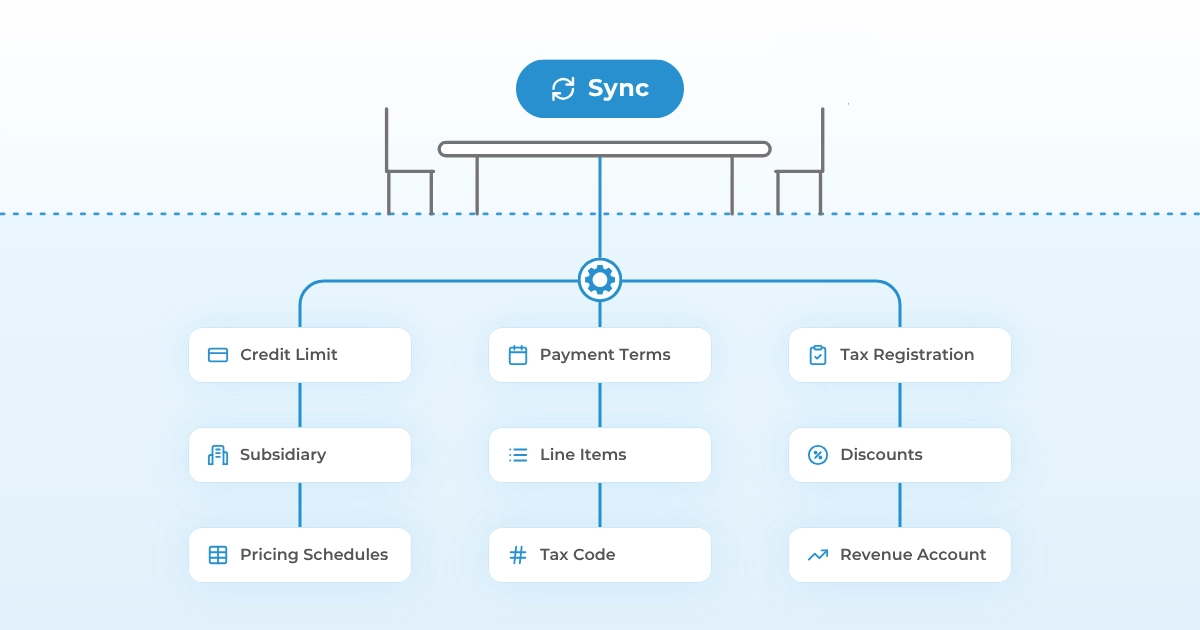
An Account in Salesforce corresponds to a Customer in NetSuite, though not cleanly: NetSuite Customers carry credit limits, terms, tax registration, and subsidiary assignment that have no Salesforce equivalent. An Opportunity becomes a Sales Order, which means someone has to decide what happens to line items, discounts, and pricing schedules along the way. Products and Price Book Entries map to Items, and NetSuite Items carry inventory, revenue account, and tax code attributes that Salesforce never tracks.
Then it all runs the other way. Invoice status, payment status, credit memos, fulfilment updates: all of it goes back into Salesforce, for an obvious reason. Your account managers should see the same numbers finance sees, without having to ask.
If your team is on OneWorld, add subsidiary routing to that list. One Salesforce org commonly feeds several NetSuite subsidiaries, each with its own currency, its own tax rules, and its own chart of accounts. Every record that crosses has to land against the right one.
Route one wrong and nothing breaks, which is exactly the problem. The invoice is correctly formatted and every field validates. It’s simply posted against an entity that never made the sale. You find out weeks later during close, and by then you’re explaining it to an auditor instead of a developer.
A Word About Governance: How NetSuite Puts Every Script on an Allowance
NetSuite gives each script a spending budget, measured in operations rather than time. Every call your script makes costs a set number of units. Run out, and NetSuite stops the script where it stands, so whatever it was halfway through doing simply doesn’t happen. You find out from an error code: SSS_USAGE_LIMIT_EXCEEDED.
NetSuite calls this governance. If your team is coming from Salesforce or Jira, governance is the constraint that will catch them off guard, since neither platform has anything comparable.
So what does the budget actually buy? A User Event script, the kind that fires when a record gets created or updated, gets 1,000 governance units for the whole run. Loading a transaction record costs you 10. Saving it costs 20. A search costs 10. One ordinary operation has therefore spent 40 units before your script does anything you actually wrote it to do.
Transaction records are the expensive category. Saving an Invoice costs 20 units. Saving a custom record costs 4.
And here’s the part that surprises people: you can’t buy your way out. Support tickets don’t raise the governance ceiling, and no licence tier includes more of it. The limit is simply the limit. Your only move is architectural: pick a different script type, restructure the logic, push heavy work into Map/Reduce, batch the operations you originally wrote one at a time.
Naturally, none of this surfaces in a proof of concept. One Sales Order in a sandbox sails through on a fraction of the budget. That same script hitting a 200-line order during a month-end push does not. So governance failures show up at exactly the volume where the integration finally matters, which is obviously a bad moment to learn the architecture needs rebuilding.
There’s a second ceiling as well, and it sits at the account level: concurrency. Your integration shares that one with every other integration already talking to your NetSuite instance.
Why QA Costs More on an ERP Integration
Obviously enough, most teams budget QA as a percentage of development. But on an ERP integration that logic breaks, for reasons entirely unrelated to code.
Think about what a sync failure actually costs you on each side. Between Salesforce and Jira, it costs you a stale ticket: someone notices, someone fixes it, the day continues. Between Salesforce and NetSuite, the same failure can produce a duplicate invoice, a sales order sitting against the wrong subsidiary, a payment applied to the wrong customer, or a revenue figure that no longer reconciles. Every one of those has audit implications. And they surface late, usually during close, when your finance team has the least patience for surprises.
So your test suite has to cover things you’d skip anywhere else. Idempotency comes first: if a webhook retries, you need certainty it won’t create a second invoice. Then rounding, because two systems doing multi-currency arithmetic will eventually disagree by a cent, and a cent is enough to fail a reconciliation. Tax calculation has to match on both sides. And you need a plan for partial failures, since an order that syncs its header but drops its line items is worse than one that fails outright, and much harder to notice.
This is where most custom NetSuite integrations run past their estimate. Development has an end. Getting a finance team to sign off on it is a slower process, and it should be, because they’re the ones who answer for the numbers.
How to Budget a Custom Salesforce-NetSuite Integration: The Estimate Problem
Anyone who quotes your Salesforce-NetSuite integration precisely, before anyone has looked inside your NetSuite account, is guessing.
Here is what moves the number, sometimes by a lot:
- How customised your account is. A fresh instance behaves predictably. Ten years of accumulated custom records, custom fields, workflow scripts, and SuiteApps do not, and usually your administrator is the only person who knows where the surprises are buried. Every one of those customisations is a surface your integration can collide with.
- Whether you’re on OneWorld. Subsidiary routing, multi-currency, and consolidated reporting each bring their own logic and their own test cases.
- Peak transaction volume. Governance and concurrency limits mean the architecture that handles 50 orders a day is a different architecture from the one that handles 5,000. You pick it at the start, and changing your mind two quarters in is expensive.
- Which way the data flows. One-way sync costs a fraction of bidirectional sync with conflict resolution. Most teams who scope one-way come back asking for the other within a quarter.
- How much of quote-to-cash you include. Accounts and orders only, or the full chain through invoicing, payments, and credit memos.
For a sense of scale, our Salesforce-Jira work is the closest reference we have. Simpler data model, no governance ceiling, and we estimated 100-140 hours for a bare minimum viable integration, 470-680 hours for full parity with a production connector, then 112-240 hours a year to keep it running afterwards.
Peeklogic Connector: the Best Solution to Integrate Salesforce and NetSuite
Learn moreReleases Twice a Year, Whether You’re Ready or Not
NetSuite ships two major releases a year, typically spring and autumn, plus minor releases and hot pushes in between. Accounts get upgraded on NetSuite’s schedule regardless of whether the customer is ready. There is no version pinning and no deferral.
What that means operationally: twice a year, someone tests the integration against a Release Preview account before the upgrade reaches production. Oracle pushes releases to sandbox accounts roughly four weeks ahead of production, which is the entire window for finding and fixing anything that broke.
Custom scripts, RESTlets, and SuiteScript-based integrations sit near the top of the re-test list every cycle. Platform behaviour changes underneath customisations, and a script that ran correctly for eighteen months can start throwing errors because the underlying object structure moved.
Salesforce adds three seasonal releases on top of that. So a custom Salesforce-NetSuite integration faces five scheduled compatibility events a year, two of which come with a hard deadline and a fixed testing window.
Where AI Helps, and Where It Can’t
Honestly? AI coding tools write SuiteScript reasonably well. The language is JavaScript-based, the Oracle documentation is extensive, and the common patterns are well represented in public code. Boilerplate, RESTlet scaffolding, and standard record operations all benefit.
Governance optimisation is a harder case. Deciding whether a workflow belongs in a User Event script or a Map/Reduce job, and restructuring the logic so it fits inside a unit budget, is an architectural judgment about a specific account’s data volume. A model that has not seen your transaction throughput cannot make it.
And the testing does not compress at all. AI cannot validate that an invoice posts to the correct subsidiary in your chart of accounts, because it has no access to your chart of accounts. That verification is human, and in an ERP context it is the majority of the risk.
So AI has moved the coding time. Thus far, it has not moved the parts of an ERP integration that actually determine whether it ships.
What Peeklogic Connector Does Instead
Peeklogic Connector for NetSuite arrives with the integration layer already built and already tested against both platforms. Authentication, bidirectional sync, object and field mapping, error handling, and retry behaviour ship with the product and get configured through an interface.
Governance is handled at the product level, which matters more than it sounds. The scripts have already been architected to operate inside NetSuite’s unit budgets, and that architecture has been exercised against production volumes rather than sandbox samples.
Configuration Instead of Development
Object mapping, field selection, and sync direction are choices made in a UI. Changing one later means changing a setting rather than opening a ticket, waiting for a sprint, and re-testing a script.
That shifts who can own the integration. A Salesforce admin can configure and adjust it without writing SuiteScript or reasoning about usage units.
Release Cycles Handled Upstream
When NetSuite ships 2026.2, Peeklogic tests compatibility and updates the connector. When Salesforce ships Winter, the same thing happens. Customers keep their Release Preview window for testing their own customisations, which is where it was more useful anyway.
The knowledge stays with the team that built the product, so an individual leaving does not take the integration’s documentation with them.
Predictable Cost
Peeklogic Connector comes with a free trial period and a fixed feel that stays the same in year three as it was in month one. Compare that against a custom build that carries not only an open-ended development cost, but also indefinite, recurring maintenance expenses.
What’s more: right now, the second year of Peeklogic comes completely free.
Get one year of Peeklogic Connector at no additional cost
Claim the limited-time offerCustom Build vs Ready-Made Connector: Side-by-Side Comparison Table
Here are the factors that typically inform the final decision.
| Custom Build | Peeklogic Connector | |
| Time to first value | Months | Hours |
| SuiteScript expertise | Required, ongoing | Not required |
| Governance architecture | Designed and tested by your team | Built into the product |
| OneWorld / multi-subsidiary | Custom routing logic per subsidiary | Configured |
| NetSuite release testing | Twice a year, 4-week window, your team | Handled by Peeklogic |
| Salesforce release testing | Three times a year, your team | Handled by Peeklogic |
| Finance sign-off testing | Full suite, every material change | Product-level regression |
| Cost trajectory | Build cost plus recurring maintenance | Flat subscription |
| Risk | Governance ceilings, knowledge dependency, audit exposure | Vendor dependency, roadmap alignment |
AI narrows the build row a bit. Every row below it stays where it is, because governance architecture, subsidiary routing, and finance validation are not code-generation problems.
What Will Your Team Ask For Next
Connecting the platforms is the start. Within a few weeks of going live, finance and sales come back with the same short list of things they now want automated. You can almost predict it:
- Your Closed Won Opportunity creates the Sales Order in NetSuite, with line items, pricing, and the right subsidiary already resolved
- Invoice and payment status land back on the Salesforce Account, so your account managers stop pinging finance to ask whether something cleared
- Credit limit and payment terms sit on the Account where a rep sees them before quoting
- A credit memo raised in NetSuite updates the linked Salesforce record on its own
- Item availability comes across, so your quotes reflect what can actually ship
With the connector, you build these in Salesforce Flow Builder, against records the integration already keeps current. Peeklogic will also configure them for you on request.
Build the same logic from scratch and every line on that list turns into hundreds of hours of work. On our Salesforce-Jira integration project, seven customer workflows came to roughly 12-18 hours of configuration with the ready-made connector. The same workflows took 560-790 hours to build from scratch. Note that Jira workflows are simpler than quote-to-cash workflows, so those hours do not transfer directly to NetSuite, but the ratio speaks for itself.
Before You Scope The Work, Ask These Questions
Whichever direction a team leans, these questions decide the outcome, and answering them early costs nothing, so we recommend doing it early on:
- How customised is the NetSuite account, really? Put that question to the administrator. The executive sponsor’s answer will be more optimistic, and this answer determines most of the estimate, so you want it to be accurate.
- Is OneWorld in scope now, or in eighteen months? Retrofitting subsidiary routing into an integration built without it is close to a rebuild.
- What does volume look like at peak? Averages are reassuring and useless here. Governance limits fail under load, and load is what month-end looks like.
- Who signs off before this touches production invoices? Get that person into the conversation during scoping rather than at UAT.
- Does bidirectional sync belong in phase one? Most teams that defer it end up requesting it within a quarter, at which point the one-way architecture has to be revisited.
- Who owns this in year two? As yourself and the build team who will test it against all of the upcoming releases, indefinitely, while also doing their actual job.
Custom NetSuite Integration vs Ready-Made Connector: Which Way Should You Go?
For a standard quote-to-cash flow between a reasonably standard Salesforce org and a reasonably standard NetSuite account, the connector wins 99 times out of a 100.
The integration layer already exists, it has already been architected around governance limits, and it stays current through two NetSuite releases and three Salesforce releases a year without anyone on your team spending time on it.
Custom development is still a valid option in narrower cases. If your NetSuite account has collected a decade of custom records and scripts, its behaviour may only fit logic written specifically for it. If you work under a compliance regime that keeps third-party software out of the path of financial data, that decides it for you before the technical conversation starts. Some business logic genuinely has no standard equivalent anywhere. And if you already run a NetSuite development practice, with certified developers and a release process, another integration is a backlog item rather than a new capability.
Even in those cases, the question worth asking first is whether a connector handling the standard layer, with custom logic built on top of it, gets further than building the whole chain from zero. Usually it does.
Because the underlying question was never build versus buy. It is whether your teams should spend the next two quarters building infrastructure, or doing the work only they can do.
Wondering what the out-of-the-box solution might look like in practice?
Book a demo and see Peeklogic Connector in action!
Book a DemoFrequently Asked Questions
Three routes. Custom development gives you full control at the highest build and maintenance cost. Middleware like MuleSoft or Workato handles transport, though you still design every mapping yourself and pay a platform licence on top. Purpose-built connectors ship the integration layer already written for one specific pair of systems, so you configure instead of building. For ERP, how customised your account is usually decides it. For ITSM, it comes down to platform constraints and how scarce the skills are.
The path runs Opportunity to Sales Order to Invoice. Your closed Opportunity has to carry line items, pricing and discounts across intact, land against the right subsidiary on OneWorld, and pick up the fields NetSuite requires that Salesforce never stored: tax code, revenue account, inventory data. Then invoice and payment status come back so your reps see what finance sees. Built from scratch, that is SuiteScript inside a governance budget. With a ready-made connector, you assemble it in Salesforce Flow Builder against records the integration already keeps current.
Judge any option on four things. Authentication should be token-based on both ends, OAuth 2.0 or TBA on the NetSuite side and Named Credentials on the Salesforce side, with no credentials sitting in script parameters. Access should be role-scoped to the records the integration needs. Anything on Salesforce AppExchange has passed Salesforce security review, which is a floor worth insisting on. And ask who patches it: a vendor-maintained connector gets security updates in the subscription, while a custom build depends on whoever still understands the code.
Three things that do not apply elsewhere. NetSuite meters script execution through governance units that cannot be increased by licence or support request. The data is financial, so error tolerance and testing requirements are considerably higher. And NetSuite upgrades every account twice a year on its own schedule, which makes compatibility testing a recurring obligation rather than an occasional one.
NetSuite assigns a unit cost to every SuiteScript API call and a fixed unit budget to each script type. A User Event script gets 1,000 units; saving a transaction record such as an Invoice costs 20 of them. When a script exceeds its budget, NetSuite terminates it immediately. The limits are fixed, so the only remedy is architectural: different script types, batching, or Map/Reduce.
It depends on how customised the NetSuite account is, whether OneWorld multi-subsidiary logic is in scope, peak transaction volume, and how much of the quote-to-cash chain is included. For scale reference from an adjacent project, a Salesforce-Jira build was estimated at 100-140 hours minimum and 470-680 hours for full feature parity. NetSuite work involves financial validation and governance architecture that a Jira build does not, so those figures are a floor rather than an estimate.
NetSuite ships two major releases a year and upgrades accounts automatically. Platform behaviour changes can affect customisations, so SuiteScript, RESTlets, and integration flows are standard items on the pre-release test list. Release Preview accounts are available roughly four weeks before production upgrade, which is the window for finding and fixing issues.

Accomplished Salesforce professional with a decade of experience in designing, developing, and managing robust integrations between Salesforce and enterprise systems, ensuring seamless data flow, operational efficiency, and enhanced business capabilities. Skilled in bridging complex technical requirements with practical business solutions to deliver secure, scalable, and high-performing integration architectures.
Contact us today!